
Teams that read our OpenSpec vs Spec Kit comparison and chose OpenSpec tend to come back with the same question a month later: it worked well for one developer, so why does it fall apart with four? The answer is that OpenSpec gives you artefacts and commands, but it does not tell you who writes the proposal, who is allowed to approve a spec, how big a change should be, or what “done” means before a folder is archived. Those are team decisions. This playbook is the set we use on Big Hat Group’s own repositories, checked against the current OpenSpec documentation , so you can adopt it as written or argue with specific parts of it.
What spec-driven development changes for a team (and what it does not)
A coding agent working from a chat prompt has one source of truth: the prompt, which disappears when the session ends. Spec-driven development moves that truth into files that are committed, reviewed and diffed like code. For a team that has three practical effects.
First, the review moves earlier. With a prompt-driven agent, the first thing a reviewer sees is a pull request. With OpenSpec, the first thing a reviewer sees is a proposal and a delta spec, which are cheap to change. A wrong scope caught at the proposal stage costs minutes; the same mistake caught in a 40-file pull request costs a day.
Second, agents become interchangeable. OpenSpec installs the same workflow into Claude Code, Codex, Cursor, GitHub Copilot and more than thirty other tools from the same openspec/ folder. A developer on Cursor and a developer on Claude Code produce the same artefacts, and either can pick up the other’s change with /openspec-apply-change <change-name>.
Third, the repository gains a record of decisions. Every archived change keeps its proposal, specs, design and tasks, so “why does the export endpoint cap at 50,000 rows?” has an answer that is not buried in a chat log.
What it does not change: the quality of the people writing requirements. An agent given a vague proposal produces a precise-looking spec for the wrong thing. Spec-driven development makes bad requirements visible earlier; it does not generate good ones. It also does not enforce anything by itself. The OpenSpec docs are explicit that artefact dependencies are “enablers, not gates”, that verify “won’t block archive, but it surfaces issues you might want to address first”, and that archive “won’t block on incomplete tasks, but it will warn you”. Enforcement is your review process, your branch protection and your CI. The sections below are about building those.
OpenSpec in one page
Artefacts and directory layout
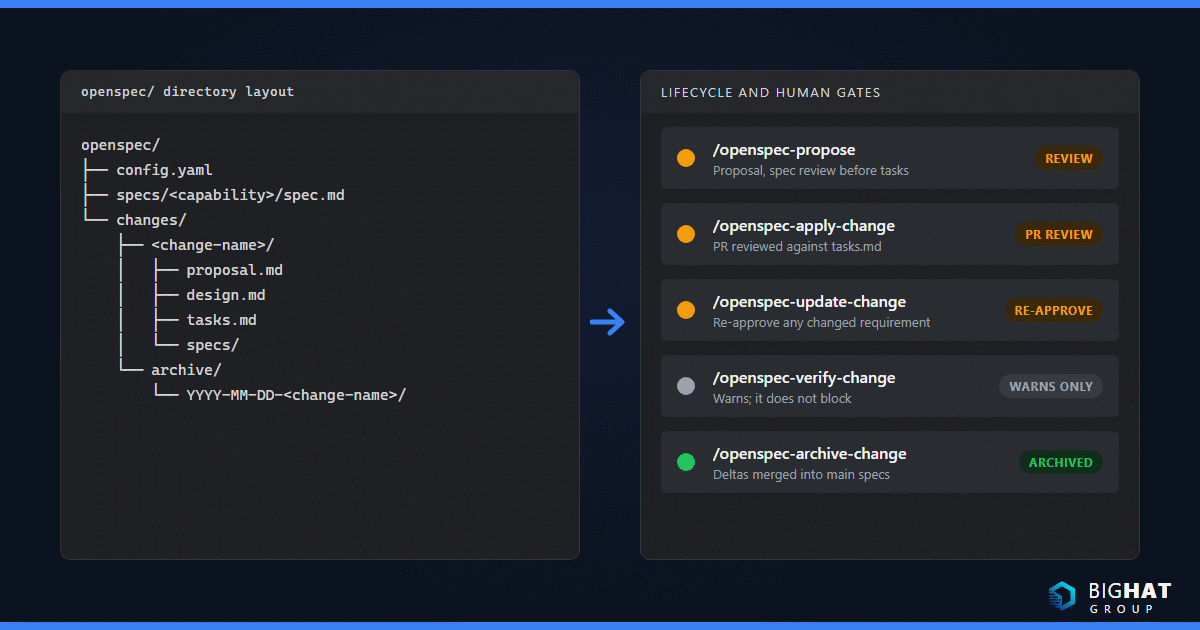
OpenSpec separates what the system does today from what you are about to change. The setup guide describes the layout:
openspec/
├── config.yaml                 # optional project configuration
├── specs/<capability>/spec.md  # main specs: current behaviour, the source of truth
└── changes/
    ├── <change-name>/
    │   ├── proposal.md         # intent, scope, approach
    │   ├── design.md           # technical approach (optional)
    │   ├── tasks.md            # implementation checklist
    │   ├── .openspec.yaml      # optional metadata (schema, retire_capabilities)
    │   └── specs/              # delta specs: only what this change alters
    └── archive/
        └── YYYY-MM-DD-<change-name>/
Main specs hold requirements written as ### Requirement: headings, each with one or more #### Scenario: blocks in GIVEN/WHEN/THEN form, using RFC 2119 words such as SHALL and MUST. Specs describe observable behaviour; implementation detail belongs in design.md or tasks.md.
Delta specs inside a change describe only what moves, under three headings: ## ADDED Requirements, ## MODIFIED Requirements and ## REMOVED Requirements. On archive, added requirements are appended to the matching main spec, modified ones replace the existing text, and removed ones are deleted. A Purpose section in a delta seeds a brand-new capability’s spec and is ignored when the spec already exists. Deleting a capability’s last requirement removes the spec file only when the change’s .openspec.yaml sets retire_capabilities: true.
The lifecycle
The artefact order is proposal, then specs and design in either order, then tasks, then implementation. The profiles page
describes which workflows are installed as skills. The core profile, the default, installs six: /openspec-explore, /openspec-propose, /openspec-apply-change, /openspec-update-change, /openspec-sync-specs and /openspec-archive-change. Six optional workflows add /openspec-new-change, /openspec-continue-change, /openspec-ff-change, /openspec-verify-change, /openspec-bulk-archive-change and /openspec-onboard; you pick them with openspec config profile (any selection other than the core six is saved as the custom profile) and then run openspec update.
| Step | Skill (Claude Code form) | Produces | Human gate in this playbook |
|---|---|---|---|
| Explore | /openspec-explore | Nothing on disk unless you ask | None; optional thinking partner |
| Propose | /openspec-propose <name> (core) or /openspec-new-change then /openspec-ff-change or /openspec-continue-change (optional) | openspec/changes/<name>/ with proposal, delta specs, design, tasks | Proposal and spec review before any task runs |
| Apply | /openspec-apply-change [name] | Code; tasks ticked in tasks.md | Pull request review against tasks and scenarios |
| Update | /openspec-update-change | Refined artefacts when implementation teaches you something | Reviewer re-approves any changed requirement |
| Verify | /openspec-verify-change (optional) | Completeness, correctness and coherence report | Lead reads it; warnings resolved or recorded |
| Sync | /openspec-sync-specs | Delta specs merged into main specs without archiving | Optional; required when other changes depend on the new behaviour |
| Archive | /openspec-archive-change or openspec archive <name> --yes | openspec/changes/archive/YYYY-MM-DD-<name>/, deltas merged | Definition of done met |
The CLI
The skills run inside the agent. The openspec binary runs in your terminal and in CI. The commands we use daily, from the CLI reference
:
openspec list                       # changes in flight (add --specs for main specs)
openspec status --change <name>     # which artefacts exist, which are blocked
openspec show <name> --json --deltas-only  # a change's delta specs as JSON
openspec validate --all --strict    # structural checks on every change and spec
openspec validate --archived        # archived changes have every task ticked
openspec archive <name> --yes       # merge deltas and move the folder, no prompts
openspec update                     # regenerate skills after an upgrade or profile change
Setting up a repository
Install and init
The default install is a standalone binary that needs no Node.js (curl -fsSL https://openspec.dev/cli/install.sh | sh, or irm https://openspec.dev/cli/install.ps1 | iex on Windows). The npm package is @fission-ai/openspec, at 2.0.x as I write this, and needs Node.js 22.12.0 or later; the README also lists brew install openspec. Teams on 1.x can stay on 1.15.0, the last release that runs on Node.js 20, and should read the upgrade guide
before moving to 2.0.
npm install -g @fission-ai/openspec@latest
cd your-repo
openspec init --tools claude,cursor,github-copilot,codex
openspec init creates the openspec/ folder structure and the tool integrations. --tools accepts all, none or a comma-separated list of tool IDs; --profile <core|custom> picks the workflow set; --force cleans up legacy files without prompting. This playbook also uses the verify, new-change and continue-change skills, which are not in the default core profile, so run openspec config profile, select them, and run openspec update before you commit. Commit everything it generates. The skills are part of the repository the same way .editorconfig is: a developer who clones the repo should get the same workflow without running anything.
Then add a project configuration. The context key is injected into every artefact prompt, and rules entries are injected only into the prompt for the matching artefact, so this is where team conventions go rather than into the generated skill files (which openspec update overwrites):
# openspec/config.yaml
schema: spec-driven

context: |
  Tech stack: TypeScript 5, Fastify, PostgreSQL 16, Vitest.
  Every HTTP endpoint is documented in docs/api/openapi.yaml.
  Public API behaviour is backwards compatible within a major version.

rules:
  proposal:
    - Link the tracking ticket in a "Links" section
    - State what is out of scope
  specs:
    - One testable GIVEN/WHEN/THEN scenario per requirement at minimum
    - Describe behaviour an operator can observe, never a function name
  tasks:
    - Group tasks by layer (API, UI, tests, docs) and keep each under a day

operations:
  apply:
    guidance:
      - Run the focused test file before the full suite
  archive:
    guidance:
      - Keep the completion summary to five lines
Which agents it configures
OpenSpec 2.0 writes each skill once, to .agents/skills/, and links it into tools that need their own folder. From the supported tools list
:
| Tool | --tools ID | Skills written to | Invocation |
|---|---|---|---|
| Claude Code | claude | .agents/skills/openspec-*/ (linked from .claude/skills/) | /openspec-propose |
| Codex | codex | .agents/skills/openspec-*/ | $openspec-propose |
| Cursor | cursor | .agents/skills/openspec-*/ | /openspec-propose |
| GitHub Copilot | github-copilot | .agents/skills/openspec-*/ | /openspec-propose |
Two details trip teams up. On Windows, committed skill links check out as small text files unless core.symlinks is enabled and Developer Mode is on; openspec update then replaces them with copies. And selecting Copilot can opt the project into cloud coding agent files, .github/workflows/copilot-setup-steps.yml and .github/agents/openspec.agent.md, controlled by githubCopilot.cloudAgent in config.yaml. Decide that deliberately; it is a workflow in your CI.
For Claude Code specifically, the skills documentation
explains why a skill works as a slash command: custom commands “have been merged into skills”, so a .claude/skills/deploy/SKILL.md creates /deploy just as a .claude/commands/deploy.md file does. Project skills are meant to be committed “so your team gets it too”, which is exactly what you want here.
Coexisting with CLAUDE.md and AGENTS.md
This is the question I get most often, and the answer is simpler than people expect. The current OpenSpec release does not create or edit AGENTS.md; if an older root AGENTS.md still carries OpenSpec marker blocks, openspec update strips them. Apart from stripping marker blocks an older release left in CLAUDE.md, it does not touch that file either. OpenSpec lives in skills and in openspec/config.yaml; your instruction files remain yours.
What you should add to CLAUDE.md (or AGENTS.md) is a short pointer, because the Claude Code memory docs
confirm that Claude reads CLAUDE.md “at the start of every session”, and reads AGENTS.md instead only when no CLAUDE.md exists in the working directory or above it. Three lines are enough:
## Workflow
- Before changing behaviour, read the relevant file under openspec/specs/.
- Behaviour changes go through an OpenSpec change (/openspec-propose); do not start coding from the ticket alone.
- Never edit files under .agents/skills/openspec-* by hand; change openspec/config.yaml and run openspec update.
Keep coding standards, build commands and security boundaries where they already are. Our CLAUDE.md guide for enterprise teams covers that file in depth, and the anatomy of a Claude Code project shows where skills, rules and hooks sit around it. OpenSpec adds one layer to that anatomy; it does not replace any of the others.
Team roles and the review gates
OpenSpec will happily let one person run /openspec-ff-change and /openspec-apply-change in a single sitting with no one else involved. For a prototype that is fine. For a shared codebase, decide who owns each gate before the first change is opened.
| Gate | Artefact | Written by | Approved by | Pass condition |
|---|---|---|---|---|
| Proposal | proposal.md | The engineer taking the work, with the agent | Product owner or tech lead | Intent, scope and out-of-scope agreed; ticket linked |
| Specs | specs/<capability>/spec.md (delta) | Same engineer | Tech lead plus one peer | Every requirement has at least one testable scenario; behaviour only |
| Design | design.md | Engineer; optional for small changes | Architect or tech lead | Decisions and risks named; nothing contradicts the specs |
| Tasks | tasks.md | Engineer with the agent | Tech lead | Grouped, each under a day, each traceable to a scenario |
| Pull request | Code plus ticked tasks | Agent and engineer | A peer | A test per scenario; tasks.md matches the diff |
| Archive | Archived folder | Engineer | Tech lead | /openspec-verify-change clean, validate --strict passes, specs synced |
Who writes proposals. The person who will do the work, not the product owner. A proposal written by the implementer and approved by the owner catches scope misunderstandings in both directions. Product people are welcome to run /openspec-explore with the agent first; it writes nothing to disk unless asked, so it is a safe place to think.
Who approves specs. Two people, and one of them must not be the author. Spec review is where the team asks “is this the behaviour we want?” and “can I write a test for this scenario as written?”. If the answer to the second is no, the scenario is not finished.
How design review works. We skip design.md for changes with no architectural decision, and the OpenSpec dependency graph allows that. When a design exists, the reviewer reads it against the delta specs and asks one question: does any decision here change observable behaviour that the spec does not mention? If yes, the spec is wrong, not the design.
Definition of done. A change is done when the pull request is merged, every task in tasks.md is ticked, /openspec-verify-change reports no unresolved warnings, openspec validate --all --strict passes, and the specs have been synced or will be by the archive step. Then, and only then, the engineer runs /openspec-archive-change. Archiving is part of the work, not housekeeping for later; a change that sits in openspec/changes/ for weeks after merge is the single most common way these repositories rot.
A worked example: proposal to archive
Here is a small change taken end to end. The product is an internal device-compliance reporting service; the ticket asks for a CSV export of the on-screen report. The engineer runs /openspec-new-change add-device-report-csv-export and then /openspec-continue-change four times, reviewing each artefact.
openspec/changes/add-device-report-csv-export/proposal.md:
# Proposal: Add CSV export to the device compliance report

## Intent
Operators rebuild the device report in a spreadsheet every Monday to share it
with the service desk. Give them a one-click export that reflects the filters
they already applied on screen.

## Scope
- A CSV export action on the device report page
- The export honours the active filters and visible columns
- A hard row limit so a careless export cannot pin the database

## Out of scope
- Scheduled or emailed exports
- XLSX output

## Links
- Ticket: OPS-412
- Related spec: openspec/specs/device-report/spec.mdopenspec/changes/add-device-report-csv-export/specs/device-report/spec.md:
## ADDED Requirements

### Requirement: CSV export of the device report
The system SHALL let a signed-in operator download the device report as a CSV
file that contains exactly the rows and columns visible on screen at the time
of export.

#### Scenario: Export with active filters
- GIVEN an operator has filtered the report to non-compliant devices
- WHEN they choose Export CSV
- THEN the downloaded file contains only the filtered rows and the visible
  columns, with a header row

#### Scenario: Export exceeds the row limit
- GIVEN the filtered result exceeds 50,000 rows
- WHEN the operator chooses Export CSV
- THEN the system refuses the export and tells the operator to narrow the
filter, and no file is producedopenspec/changes/add-device-report-csv-export/design.md:
# Design: CSV export

## Decisions
- Reuse the list endpoint's query parser so the export and the table can
  never disagree about filters.
- Stream the response as text/csv rather than building the file in memory.
- Enforce the 50,000-row limit with a COUNT before streaming.

## Risks
- COUNT on a wide filter is slow on the largest tenants; acceptable because
the same query already runs for pagination.openspec/changes/add-device-report-csv-export/tasks.md:
## 1. API
- [ ] 1.1 Add GET /api/reports/devices/export accepting the list endpoint's
      query parameters
- [ ] 1.2 Return 422 with a clear message when the filtered count exceeds
      50,000 (Scenario: Export exceeds the row limit)
- [ ] 1.3 Stream text/csv with a header row (Scenario: Export with active
      filters)

## 2. UI
- [ ] 2.1 Add an Export CSV button to the report toolbar that submits the
      current filter state
- [ ] 2.2 Show the 422 message inline

## 3. Tests and docs
- [ ] 3.1 Integration test per scenario
- [ ] 3.2 Document the endpoint in docs/api/openapi.yaml
The tech lead approves the proposal and the spec in the pull request that adds the change folder. The engineer then runs /openspec-apply-change add-device-report-csv-export; the agent works through the tasks and ticks them. Partway through, the team decides the limit message should also suggest exporting by site, so the engineer runs /openspec-update-change, adjusts the second scenario’s THEN clause, and the reviewer re-approves that one line. The code pull request is reviewed against tasks.md and the two scenarios, merged, and the engineer finishes with:
openspec validate --all --strict
openspec archive add-device-report-csv-export --yes
The folder is now openspec/changes/archive/2026-11-18-add-device-report-csv-export/, and openspec/specs/device-report/spec.md contains the new requirement alongside the ones that were already there. Anyone reading the main spec next year can trace the requirement back to the archived proposal, the ticket and the design decision about streaming.
Conventions that keep the system honest
Naming. Change names are lowercase kebab-case (the CLI requires it) and start with a verb: add-, fix-, remove-, migrate-. Capability folders under specs/ are nouns that name a user-facing area (device-report, tenant-onboarding), never a code module. Capabilities outlive refactors; modules do not.
Sizing changes. A change should land in one or two pull requests and a working week at most. If the task list runs past about fifteen items or touches more than one capability, split it. OpenSpec’s own guidance on update versus new is the test we use: refine the existing change when the intent is the same and the execution is being adjusted; open a new change when the intent itself has shifted, the scope has grown into different work, or the original can be closed on its own.
Delta specs versus main specs. Never edit openspec/specs/ by hand. Every change to a main spec arrives through a delta that was reviewed and then merged by openspec archive or /openspec-sync-specs. Deltas also keep reviews small; a reviewer reads the one requirement that moved rather than a 400-line spec.
Parallel changes. Several changes can be open at once, and you switch between them with /openspec-apply-change <change-name>. The constraint to enforce in review is that two open changes must not modify the same requirement. If they must, finish one first, sync it so the second change’s delta is written against the new text, then continue. /openspec-bulk-archive-change detects overlapping spec edits and applies them chronologically, but detection after the fact is a safety net, not a plan.
Keeping specs honest after implementation. Implementation teaches you things the proposal did not know. The rule is that the spec changes before the code does: run /openspec-update-change, edit the scenario, get the one-line re-approval, then let the agent continue. A spec that says 50,000 while the code says 25,000 is worse than no spec, because the next agent will trust it.
Our own history. The repository behind this website still carries an earlier layout from before we adopted change folders: an openspec/proposals/ directory of numbered Markdown files, each headed with Status, Priority, Depends on and the Linear ticket, followed by Objective, Background, a Scope checklist and Acceptance Criteria, with an archive/ subfolder for finished work. Those header fields survived the move to the current layout because they are what reviewers actually read, and the Status line, updated with a date and what shipped, turned out to be the most useful sentence in each file. If you are migrating from a home-grown format, keep whatever your reviewers already rely on and map it into proposal.md.
Governance: specs as the audit trail
Archived changes are a decision log that auditors and new hires can both read. Three practices make it one you can rely on.
Link every change to a ticket. The Links section of the proposal carries the ticket ID, and the ticket carries the change name. The rules.proposal entry in config.yaml above makes the agent ask for it. Do not copy the task list into the ticket; one source of truth, and it is tasks.md.
Define what reviewers check. For the proposal: intent in one paragraph, explicit out-of-scope, ticket linked. For the spec: behaviour only, RFC 2119 wording, one testable scenario per requirement at minimum, and nothing that contradicts an existing requirement in the main spec (openspec show <capability> --type spec --json --requirements prints them). For the pull request: a test per scenario and a tasks.md whose ticks match the diff. For the archive: openspec validate --archived clean, which checks that archived changes have every task ticked.
Measure two things. Cycle time is the number of days between the commit that adds proposal.md and the commit that moves the folder to archive/; both are git history, so a short script in CI can report it per change without anyone filling in a form. Rework is the count of /openspec-update-change commits that touch a delta spec after /openspec-apply-change has started, plus any requirement modified again within thirty days of archiving. Rising cycle time means changes are too big; rising rework means proposals are approved before they are understood. Spec coverage, the share of merged behaviour-changing pull requests that reference a change folder, tells you whether the process is being bypassed.
Multi-repository teams should look at OpenSpec stores, currently in beta, which keep planning artefacts in a separate repository so one change can span several codebases and shared requirements can be read-only consumers. The CLI has openspec store setup, openspec new change --store <id> and openspec doctor. We have not run stores in production yet, so treat that as a pointer rather than a recommendation.
Pitfalls seen in practice
- Specs that describe implementation. “The
exportDevicesfunction returns a stream” is not a requirement. If the sentence names a function, a table or a class, move it todesign.mdand rewrite the requirement as something an operator could observe. - Changes that never archive. Merged code with an open change folder confuses the next agent, which may treat the stale tasks as work to do. Make archive part of the pull request checklist.
- Hand-editing generated skills. Edits inside OpenSpec-managed files are replaced on the next
openspec update. Team rules belong inopenspec/config.yaml. - Skipping
openspec updateafter an upgrade. Two developers on different versions produce different artefacts and blame each other. Pin the version in your setup docs and re-runupdatein the same pull request that bumps it. - Treating
/openspec-verify-changeas a gate. It warns; it does not block. Your review does the blocking. - Proposing and approving in one context window. The README notes that OpenSpec “benefits from a clean context window” and advises clearing it before implementation. The reviewer must also be a different person; the agent that wrote the spec will confirm its own spec every time.
- Two open changes on one requirement. See the parallel-changes rule above. The symptom is a delta that assumes text the main spec no longer contains.
- Giant changes. A thirty-task change means the proposal was a project plan. Split it at the capability boundary.
When Spec Kit or plain issues are the better fit
OpenSpec is not the only way to do this, and it is not always the best one. GitHub’s Spec Kit
installs with uv tool install specify-cli (Python 3.11 and later), asks you to create a constitution once per project, and then runs each feature through /speckit-specify, /speckit-plan, /speckit-tasks and /speckit-implement, with /speckit-converge and clarification and checklist steps documented in its walkthrough. If your organization wants a single constitution that every phase respects and is willing to pay for the heavier pipeline, it is a strong choice, and both projects are MIT-licensed. Our comparison post goes deeper on the trade-offs; the short version is that Spec Kit optimizes for a fixed governed pipeline and OpenSpec for lightweight, parallel, agent-agnostic change folders.
Plain issues and pull requests remain correct for anything where the acceptance criterion is the ticket title: a dependency bump, a typo, a one-line bug whose test already exists, a documentation edit. Opening a change folder for those is ceremony without value, and a team that is made to do it will quietly stop using the process for the changes that matter. Our line is simple: if observable behaviour changes, it is an OpenSpec change; if it does not, it is a ticket. If you want something in between for medium work, OpenSpec lets you define a lighter schema, for example openspec schema init rapid --description "Rapid iteration" --artifacts "proposal,tasks", and select it per change with --schema.
What to do about it
- Install OpenSpec from
@fission-ai/openspec@lateston Node.js 22.12.0 or later (or use the standalone binary) and runopenspec init --tools <ids>with the IDs for every agent your team actually uses; commit the result. - Write
openspec/config.yamlwith acontextblock describing the stack andrulesfor proposal, specs and tasks; never edit the generated skill files. - Add three workflow lines to
CLAUDE.mdorAGENTS.mdpointing toopenspec/specs/and the propose command. - Agree the gate table: who approves proposals, who approves specs, when
design.mdis required, and what done means. - Protect
mainso that a change folder’s proposal and delta spec are merged in a reviewed pull request before any/openspec-apply-changebegins. - Add
openspec validate --all --strictandopenspec validate --archivedto CI. - Put “archive the change” on the pull request template checklist.
- Seed
openspec/specs/with the current behaviour of two or three capabilities before the first change, so deltas have something to be deltas against. - Report cycle time, rework and spec coverage monthly from git history; adjust change sizing when they drift.
- Re-run
openspec updatein the same pull request as every version bump.
Frequently asked questions
What is OpenSpec and how does it work with coding agents? OpenSpec is an MIT-licensed Node.js CLI, @fission-ai/openspec, that adds a spec-driven workflow to coding agents. Current behaviour lives in openspec/specs/, each piece of work in openspec/changes/<name>/ with a proposal, delta specs, a design and a task list, and it installs skills for more than thirty tools, including Claude Code, Codex, Cursor and GitHub Copilot.
Do I need to write all four OpenSpec artefacts for every change? No. The proposal is the root, specs and design depend on it, and tasks depend on both; the project documents these dependencies as enablers rather than gates, and design.md is optional. Our rule: a behaviour change always gets a proposal, a delta spec and tasks; design only when there is a decision a reviewer would want to see.
How does OpenSpec work with CLAUDE.md and AGENTS.md? The current release writes its instructions only as skills, in a shared .agents/skills/ folder, and does not create or edit AGENTS.md or CLAUDE.md. Keep your conventions where they are, add a short pointer, and put OpenSpec-specific rules in openspec/config.yaml.
How should a team review OpenSpec changes? Review the artefacts, not just the code: a lead approves the proposal, a peer checks that every requirement has a testable scenario, the pull request is read against tasks.md and the scenarios, and the change is archived only after /openspec-verify-change is clean and openspec validate --all --strict passes.
When should I use Spec Kit instead of OpenSpec? When you want a project constitution written once and applied through a fixed specify, plan, tasks and implement pipeline, and the team accepts the heavier process. Use OpenSpec for lighter change folders shared across agents with parallel changes and delta specs. For one-line fixes, use a plain issue either way.
Need a second pair of hands? Big Hat Group provides application development consulting for organizations in the United States and Canada, from a two-week spec-driven workflow setup across your repositories to a full build with coding agents under review gates. Book a discovery call to talk through your environment.
Sources
- OpenSpec README (Fission-AI/OpenSpec)
- OpenSpec docs: Installation
- OpenSpec docs: Set up your project
- OpenSpec docs: Profiles
- OpenSpec docs: Skills
- OpenSpec docs: CLI
- OpenSpec docs: Supported tools
- OpenSpec docs: Customize
- @fission-ai/openspec on npm
- Claude Code docs: Skills
- Claude Code docs: How Claude remembers your project
- GitHub Spec Kit README