
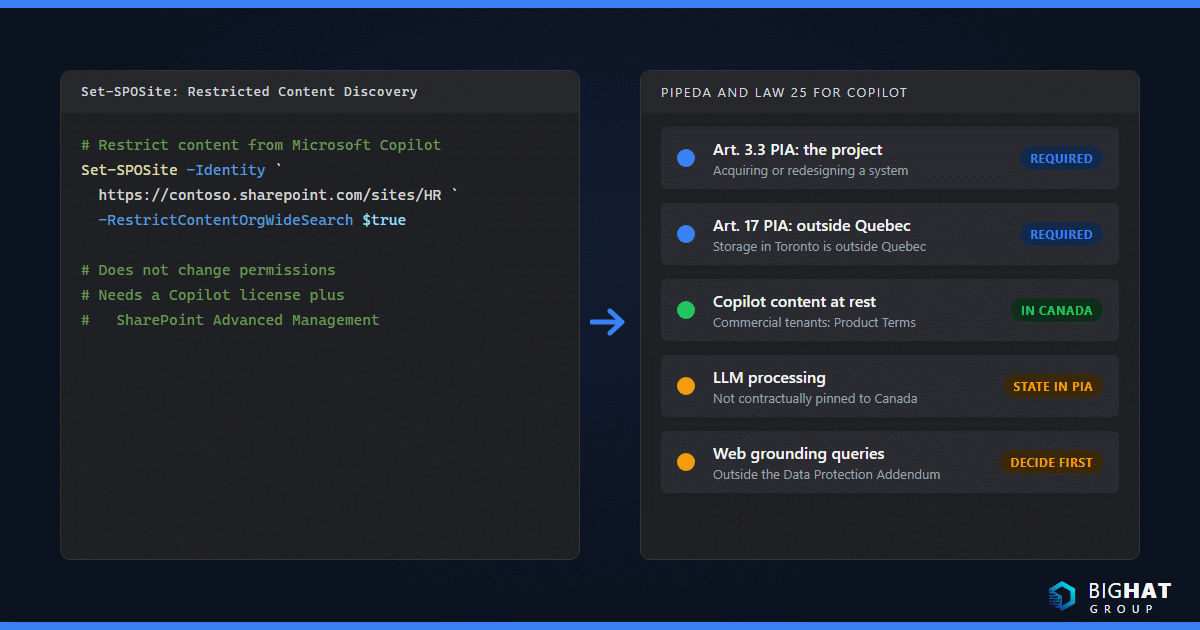
A Microsoft 365 Copilot rollout in Canada runs into two privacy regimes at once: the federal Personal Information Protection and Electronic Documents Act (PIPEDA) and, for anyone with staff or customers in Quebec, the province’s private-sector Act as modernized by Law 25. Neither law mentions Copilot, and neither needs to. They regulate what you do with personal information, and Copilot is a new way of reading, summarizing and acting on the personal information you already hold. This guide is the checklist I use with Canadian IT and privacy leads to get from “we bought licenses” to “we can defend this rollout to the Privacy Commissioner or the Commission d’accès à l’information.” It maps each obligation to a Microsoft control, names the evidence to keep, and ends with a 60-day plan.
One sentence before we start: I am an architect, not a lawyer, and this is not legal advice. Your privacy counsel owns the legal conclusions; this guide gives them an accurate technical picture to work from.
Why this comes up now
PIPEDA applies to private-sector organizations across Canada that collect, use or disclose personal information in the course of commercial activity, and it also covers the personal information of employees of federally regulated businesses, according to the Office of the Privacy Commissioner’s PIPEDA overview . Alberta, British Columbia and Quebec have private-sector laws deemed substantially similar, so organizations operating entirely within those provinces follow the provincial law instead. Quebec’s version matters most for a Copilot project because Law 25 added obligations that PIPEDA does not have: a person in charge of personal information protection who is, by default, the enterprise’s highest authority and whose title and contact details must be published, mandatory privacy impact assessments, a disclosure duty for automated decisions and administrative penalties with real teeth.
Two more documents frame the conversation. In December 2023 the OPC and every provincial and territorial privacy regulator, including the Commission d’accès à l’information du Québec (CAI), signed the Principles for responsible, trustworthy and privacy-protective generative AI technologies . It is guidance, not law, but it tells you how the regulators will read PIPEDA and Law 25 when generative AI is involved: document your legal authority, prove necessity and proportionality, disclose when AI supports decisions, keep records so access requests can be answered, avoid retaining prompts unless required, and defend against prompt injection. Federally, Bill C-27 (the Digital Charter Implementation Act, 2022, which carried the Artificial Intelligence and Data Act) was still at committee stage when the parliamentary session ended on January 6, 2025, according to LEGISinfo , so there is no federal AI statute to plan for today. Federal privacy reform is back, though: Bill C-36, the Protecting Privacy and Consumer Data Act, was tabled on June 15, 2026 to replace PIPEDA’s privacy rules and was at second reading in the House of Commons as of November 2026, so watch it before you finalize a multi-year PIA.
Where PIPEDA and Law 25 touch a Copilot rollout
PIPEDA’s ten principles, read for Copilot
PIPEDA is built on ten fair information principles . Most of them land on Copilot in a specific way, and PIPEDA’s separate breach rules add one more obligation:
- Accountability. Someone must answer for the personal information Copilot can reach. In practice that is a named owner for the Copilot program who signs the PIA and the control decisions below.
- Identifying purposes and consent. Copilot does not collect new personal information; it reuses what is in Exchange, SharePoint, OneDrive and Teams. The question is whether summarizing, searching and drafting with that information is consistent with the purposes you identified when you collected it. For employee data in a federally regulated workplace, and for any customer data, this is the heart of the legal analysis.
- Limiting collection, use, disclosure and retention. Copilot stores prompts and responses. Without a retention policy they have no deletion schedule, which the OPC’s generative AI principles specifically call out.
- Safeguards. Security proportionate to sensitivity. Copilot inherits your permission model, which means it also inherits every oversharing mistake in SharePoint.
- Openness. Your privacy policies must say that you use generative AI on personal information and how.
- Individual access. People can ask what you hold about them. Copilot prompts and responses that mention them are personal information and must be findable.
- Breach of security safeguards. Under PIPEDA you must report breaches that create a real risk of significant harm to the OPC, notify affected individuals as soon as feasible, and keep a record of every breach for two years , whether or not it met the harm threshold.
Law 25 specifics
Quebec’s obligations came into force in three waves. The CAI’s aide-mémoire for enterprises dates them: September 22, 2022 for the privacy officer and the confidentiality incident regime; September 22, 2023 for governance policies, privacy impact assessments, the new consent and transparency rules, destruction or anonymization, default privacy settings and the duty to inform people about decisions based exclusively on automated processing; and September 22, 2024 for data portability. The items that bite on a Copilot project:
- Person in charge of personal information protection. By default this is the person with the highest authority in the enterprise, who may delegate the role in writing; the title and contact details must be published on your website. The CAI’s guidance on the role says this person must take part in privacy impact assessments from the start of a project and receives notices of confidentiality incidents.
- Privacy impact assessment for the project. The CAI’s PIA guide (version 3.1, April 2024) lists article 3.3 of the private-sector Act: a PIA is mandatory for any project to acquire, develop or redesign an information system or electronic service delivery involving personal information. Deploying Copilot across your tenant is exactly that. The assessment must be proportionate to the sensitivity, purpose, quantity, distribution and medium of the information.
- Privacy impact assessment for communication outside Quebec. Article 17 requires a PIA before communicating personal information outside Quebec, or before entrusting someone outside Quebec with collecting, using, communicating or storing it on your behalf. “Outside Quebec” includes other provinces, per the CAI’s use and communication guidance . The assessment weighs the sensitivity of the information, the purpose, the protection measures including contractual ones, and the legal regime of the destination. Communication may proceed only if the information would receive adequate protection, and it must always be covered by a written agreement.
- Decisions based exclusively on automated processing. You must inform the person no later than when the decision is communicated, provide on request the personal information used and the main factors behind the decision, allow correction, and give them a chance to submit observations to a staff member who can review it.
- Default privacy settings. Technology products or services offered to the public must default to the highest level of confidentiality without action by the individual; cookie settings are excluded. This touches customer-facing Copilot Studio agents more than internal Copilot.
- Confidentiality incidents. Take reasonable measures to reduce harm, notify the CAI and affected persons when there is a risk of serious injury, and keep an incident register that records every incident, including ones below the threshold, for a minimum of five years.
- Penalties. The CAI can impose administrative monetary penalties of up to $10 million or 2 percent of worldwide turnover , and penal fines for companies run up to the higher of $25 million or 4 percent of worldwide turnover.
Mapping obligations to Copilot controls
| Obligation | What it means for Copilot | Microsoft control or admin action | Evidence to keep |
|---|---|---|---|
| Accountability (PIPEDA); privacy officer (Law 25) | A named owner signs off the rollout and its controls | Assign the Microsoft Entra AI Admin or Purview Data Security AI Admin roles; name the privacy officer in the PIA | Role assignments, signed PIA, published privacy officer contact |
| Identifying purposes, consent, limiting use | Confirm Copilot’s use of existing data is consistent with stated purposes | Scope the pilot to groups; disable agents or connectors that reach data outside the purpose | Purpose statement per data domain, pilot group list |
| Limiting retention | Prompts and responses need a deletion schedule | Purview retention policy on the Microsoft Copilot experiences location | Policy export, retention rationale |
| Safeguards | Only intended users and content reach Copilot | Sensitivity labels with encryption, DLP for Copilot, Restricted Content Discovery, oversharing reports | DLP policy export, label taxonomy, Data Access Governance report |
| Openness | Tell employees and customers how you use generative AI | Updated privacy policy, employee notice, acceptable use standard | Published policy versions, acknowledgment records |
| Individual access | Find a person’s Copilot interactions on request | eDiscovery search with the Copilot activity condition; user self-service deletion | Search documentation, request log |
| Breach notification and registers | Know what Copilot touched during an incident | Purview audit (CopilotInteraction records), DSPM for AI alerts | Incident register entries, audit exports |
| PIA for the project (Law 25 art. 3.3) | Assess the Copilot system before go-live | Use Microsoft’s Copilot Risk Assessment Quickstart and Service Trust Portal materials as inputs | Completed PIA with residual risks |
| PIA for transfers outside Quebec (art. 17) | Document where data is stored and processed | Product Terms data residency, Data Location Card in the admin center, DPA | PIA section on transfers, written agreement (DPA + Product Terms) |
| Automated decisions (art. 12.1) | Agents must not decide alone on individuals without disclosure | Human-in-the-loop design for agents; agent inventory and approval | Agent register, decision disclosure text |
| Default privacy settings (art. 9.1) | Public-facing agents default to maximum privacy | Copilot Studio and web channel settings, consent flows | Settings screenshots, test results |
Data flows: what Copilot processes and where
What Copilot touches
Microsoft’s data, privacy and security page for Copilot describes the engine: large language models, content in Microsoft Graph that the user already has at least view permission to, and the Microsoft 365 apps. Prompts, responses and data accessed through Microsoft Graph are not used to train foundation LLMs. Copilot services have opted out of the Azure OpenAI abuse monitoring that includes human review. The stored content of interactions, meaning the prompt, the response and citations, is encrypted at rest and handled under the same contractual commitments as your other Microsoft 365 content, with Microsoft acting as processor under the Data Protection Addendum and Product Terms . Microsoft also names Anthropic and OpenAI as model subprocessors, managed under Copilot > Settings > AI providers operating as Microsoft subprocessors; OpenAI-operated models have been on by default for eligible commercial tenants since July 24, 2026 unless an admin selects No users, and Microsoft notes that both are currently excluded from in-country processing commitments where applicable (Anthropic models are also excluded from the EU Data Boundary).
Residency for Canadian tenants
The Product Terms data residency page lists Canada among the eligible Default Geographies. For tenants provisioned there, Microsoft commits to store Exchange Online mailbox content, SharePoint site content, OneDrive files, Teams chat messages and “any stored content of interactions with Microsoft 365 Copilot or Microsoft 365 Copilot Chat” at rest only within Canada (Education tenants without Advanced Data Residency for Education are the exception: Microsoft may store their Office 365 data anywhere in the EU or North America). Microsoft 365 Copilot was added to the commitment on March 1, 2024 and Copilot Chat on September 1, 2025. The Canadian datacenter cities are Quebec City and Toronto .
Processing is where the PIA has to be honest. The Copilot privacy page says LLM calls are routed to the closest datacenters in the region but can call into other regions during high utilization, and that customers outside the EU may have their queries processed in the US, EU or other regions. Only EU users have the EU Data Boundary. Microsoft’s data residency overview says data-in-processing documentation is “coming soon,” so today the defensible statement is: stored content stays in Canada under contract, processing location is not contractually pinned to Canada. Not everything is regional either: Microsoft Entra ID maps a Canadian tenant to a geo-location such as North America rather than to Canada. For the service-by-service picture of what stays in Canada, see our guide to Azure Canada Central versus Canada East and Microsoft 365 data residency .
Retention and deletion
Per Microsoft’s retention guidance for Copilot , prompts and responses are copied to a hidden folder in the mailbox of the user who ran the prompt. Retention policies now use a dedicated location, Microsoft Copilot experiences, covering Microsoft 365 Copilot, Security Copilot, Copilot in Fabric and Copilot Studio. The Exchange timer job runs every one to seven days, expired items sit in the SubstrateHolds folder for at least a day, and Microsoft’s own worked example shows a “delete after one day” policy taking up to 16 days to complete. When a user leaves, their Copilot messages persist in the inactive mailbox under the same policy. Users can delete their own activity history from the My Account portal, and admins can view it with Content search or Purview.
Who at Microsoft can access it
Microsoft states that engineers have no standing access to customer data. Customer Lockbox adds your approval to that workflow: it covers Exchange Online, SharePoint, OneDrive, Teams and Windows 365, and “all Microsoft 365 Copilot interactions are covered by Customer Lockbox through the support available for Exchange Online.” Requests expire after 12 hours if unanswered, access is capped at four hours, and both the approval and every engineer action are written to the audit log. It is included with E5 or available through a compliance add-on, and you turn it on under Settings > Org Settings > Security & Privacy > Customer Lockbox with Require approval for all data access requests. It does not cover law enforcement requests, which Microsoft handles separately.
Web grounding is a different flow
When web search is on, Copilot generates a short query from the prompt and sends it to Bing with user and tenant identifiers removed, although the user’s client IP address is sent so Bing can localize results. Microsoft’s web search page is explicit that the Data Protection Addendum does not apply to those generated queries, that Microsoft acts as controller for them, and that HIPAA and the EU Data Boundary do not cover them either. The Product Terms add commitments that the queries are not used to improve Bing, build advertising profiles or train models. The admin control is the Allow web search in Copilot policy in Cloud Policy service for Microsoft 365, with three options: enabled, disabled, or disabled in Work mode and enabled in Web mode and Copilot Chat. If you leave it unconfigured, web search is on for everyone. The query Copilot actually sent is visible in audit records where AISystemPlugin.Id equals BingWebSearch and in the DSPM for AI activity explorer.
The checklist
Governance
- Name the accountable owner (PIPEDA) and confirm the Law 25 privacy officer is published and involved from day one.
- Run a privacy impact assessment for the Copilot system under article 3.3 before any production group is licensed, scaled to sensitivity and volume as the CAI guide requires. Use Microsoft’s Copilot & Copilot Chat Risk Assessment Quickstart from the Service Trust Portal and the Canada regional resources listed on Microsoft’s Canada privacy laws compliance page as inputs, not as the assessment itself.
- Inventory the data Copilot can reach: run the Site permissions across your organization and Sensitivity label applied to files snapshot reports under Reports > Data access governance in the SharePoint admin center, as described in Microsoft’s Data Access Governance documentation . Note that without SharePoint Advanced Management the reports are limited.
- Record the retention decision for prompts and responses, and the reason, in the PIA.
Data protection
- Enable sensitivity labels for SharePoint and OneDrive files and apply encrypting labels to the most sensitive sets. Per Microsoft Purview’s AI protections , Copilot returns encrypted content only when the user holds both VIEW and EXTRACT usage rights.
- Create a DLP policy on the Microsoft Copilot, Copilot Chat, and Copilot Cowork location with Content contains > Sensitivity labels and the action Prevent Copilot from processing content for labels such as HR-restricted or health. Microsoft’s DLP for Copilot page notes labeled items may still appear as citations, that label and sensitive-info-type conditions cannot share one rule, and that changes take up to four hours.
- Add a second rule with Content contains > Sensitive information types and the action Processing prompts or Performing Web Searches. Microsoft’s own example uses the Canada physical addresses type. DLP cannot inspect files uploaded into a prompt, only the typed text.
- Put sites still under permission review behind Restricted Content Discovery : Active sites > site > Settings > Restrict content from Microsoft Copilot, or:
Set-SPOSite -Identity https://contoso.sharepoint.com/sites/HR -RestrictContentOrgWideSearch $trueIt does not change permissions, it needs a Copilot license plus SharePoint Advanced Management, and sites over 500,000 items can take more than a week to propagate.
- Fix the oversharing itself with Restricted access control and site access reviews; Restricted Content Discovery is documented as a temporary control.
Transparency
- Update the privacy policy and the internal notice to say that Microsoft 365 Copilot processes personal information held in Microsoft 365, that prompts and responses are stored, for how long, and who can read them in an investigation.
- Publish an acceptable use standard: no pasting of personal information from outside systems into prompts, no uploading of client files Copilot was not approved for, and a reminder that outputs must be verified before they inform a decision about a person.
- Decide and document the web grounding setting. If a Quebec entity cannot justify sending derived queries to a controller outside the DPA, set Allow web search in Copilot to disabled or to Web mode only, and put the rationale in the article 17 assessment.
Automated decision-making and agents
- Keep Copilot and Copilot Studio agents out of decisions based exclusively on automated processing about individuals, or design the disclosure, factor explanation, correction route and human review that Law 25 requires. Our Copilot agents security checklist for regulated industries covers the identity and Conditional Access side of agents.
- In the Microsoft 365 admin center, use Agents > Settings > Agent and plugin access to decide whether Microsoft, your organization and external publishers can supply agents, and User access to restrict who can install them. Microsoft’s agent settings page warns that data processed by non-Microsoft agents is not subject to Microsoft agreements.
- Review the agent registry monthly. The agent overview surfaces pending publish requests, ownerless agents and agents at risk, and agent management rules can block ownerless agents without usage in bulk. Approvals need the AI Administrator or Global Administrator role.
- For any agent that acts on its own, including Microsoft’s Autopilot agent (formerly Project Lobster and Microsoft Scout, now in private preview in the Copilot app), read our Project Lobster to Autopilot security guide before you grant it a mailbox or a Teams presence.
Monitoring and breach response
- Confirm auditing is on. Copilot audit records are generated automatically under Audit (Standard) with the CopilotInteraction operation and include AccessedResources with the sensitivity label ID of each file read, PolicyDetails when DLP blocked access, XPIADetected for cross-prompt injection, JailbreakDetected on prompts, and the model provider and name.
- Set audit retention deliberately. Audit (Standard) keeps records for 180 days ; Audit (Premium) keeps Exchange, SharePoint, OneDrive and Entra records for one year by default and other workloads for 180 days unless you create a custom policy, with a 10-year add-on available.
- Write the Copilot section of your incident playbook: pull CopilotInteraction records for the user and period, identify every resource and label touched, decide the real-risk-of-significant-harm (PIPEDA) or risk-of-serious-injury (Law 25) question with the privacy officer, and log the entry in the register either way.
- Turn on Customer Lockbox and route approval notifications to the privacy officer.
- Enable the Insider Risk Management Risky AI usage template and consider Communication Compliance for AI interactions if you operate in a regulated sector.
Vendor and contract
- File the current Microsoft Products and Services Data Protection Addendum (the most recent English edition on Microsoft’s licensing site is dated November 1, 2026; check for a newer one when you file it) and the Product Terms section “Location of Customer Data at Rest for Core Online Services” with the PIA. Together they are the written agreement article 17 asks for.
- Record the Data Location Card from the admin center as evidence of your tenant’s Committed Geography.
- Check every third-party agent’s privacy statement and terms of use in the admin center before approving it, as Microsoft directs.
Quebec specifics called out
Three things are different for a Quebec entity or a Quebec workforce, even if the rest of the company is elsewhere in Canada.
First, the article 17 assessment is unavoidable because Microsoft 365 data for a Canadian tenant is stored in the Canada geography, whose datacenters are in Toronto and Quebec City, and Toronto is outside Quebec. Storage in Ontario is literally the CAI’s own example of a communication outside Quebec that must be disclosed at collection. The assessment is proportionate, so for a well-governed tenant it can be short, but it must exist, it must consider processing outside Canada, and it must be paired with the written agreement.
Second, Law 25’s transparency duties are specific. At collection you must tell people the purposes, the means of collection, their rights, the third parties involved and the possibility of communication outside Quebec. Adding Copilot to the processing picture means revisiting that notice, not only the website privacy policy.
Third, the governance policies and practices that must be published since September 2023 should name generative AI explicitly: retention and destruction rules for prompts and responses, roles across the data lifecycle including the Copilot owner, and the complaint process. The CAI’s guide on writing a privacy policy and its incident prevention checklist are both useful templates.
A 60-day plan
| Days | Workstream | Deliverable |
|---|---|---|
| 1 to 10 | Governance | Owner and privacy officer named; article 3.3 PIA opened; Data Access Governance snapshot reports run; data inventory by sensitivity |
| 11 to 20 | Residency and contract | Article 17 assessment drafted from the Product Terms, DPA and Copilot privacy page; Data Location Card captured; web grounding decision made |
| 21 to 30 | Data protection | Label taxonomy confirmed; labels enabled for SharePoint and OneDrive; DLP for Copilot policies created in simulation mode; Restricted Content Discovery applied to review-pending sites |
| 31 to 40 | Transparency and retention | Privacy policy, employee notice and acceptable use published; retention policy on Microsoft Copilot experiences created; Customer Lockbox enabled |
| 41 to 50 | Agents and monitoring | Agent access settings set; registry reviewed; audit retention policy created; incident playbook Copilot section written and tested with one eDiscovery search |
| 51 to 60 | Pilot and sign-off | DLP moved from simulation to enforce; 50 to 100 user pilot; PIA residual risks accepted by the privacy officer; register and evidence binder closed |
What to do about it
- Treat the Copilot rollout as a Law 25 article 3.3 project and open the PIA before licensing the first production group.
- Write the article 17 transfer section from Microsoft’s own statements: stored content in Canada under the Product Terms, processing not pinned to Canada, Entra ID in the North America geo.
- Build the DLP for Copilot policy pair, label block plus sensitive-type block, and run it in simulation for two weeks before enforcing.
- Put HR, legal and health sites behind Restricted Content Discovery while permissions are fixed.
- Decide the web grounding policy and document why.
- Create the retention policy on Microsoft Copilot experiences and the audit retention policy on the same day.
- Enable Customer Lockbox and record the approver.
- Lock down agent access and publishing, and keep agents out of sole automated decisions about individuals.
- Add a Copilot section to the incident playbook and the confidentiality incident register.
- Rewrite the privacy policy, collection notice and acceptable use standard to name generative AI.
Frequently asked questions
Does Microsoft 365 Copilot comply with PIPEDA? PIPEDA compliance is the organization’s responsibility, not a property of the product. Microsoft’s Canada privacy laws compliance page states that there is no certification a cloud provider can hold for Canadian privacy law and that customers remain wholly responsible for compliance, while Microsoft provides the contractual commitments in the Data Protection Addendum and Product Terms, a Canadian Azure privacy impact assessment on the Service Trust Portal, and audit reports. Copilot gives you the controls to meet the ten fair information principles; this checklist maps them.
Do I need a privacy impact assessment before deploying Copilot in Quebec? Almost certainly yes. The CAI’s PIA guide lists two triggers that apply: article 3.3 of the private-sector Act requires an assessment for any project to acquire, develop or redesign an information system involving personal information, and article 17 requires one before communicating personal information outside Quebec. Both have been in force since September 22, 2023. The assessment must be proportionate to the sensitivity, purpose, quantity, distribution and medium of the information, and the person in charge of personal information protection must be consulted from the start of the project.
Where does Microsoft 365 Copilot store Canadian data? For tenants provisioned in Canada, the Microsoft Product Terms commit to storing the stored content of Copilot interactions at rest in Canada, alongside Exchange Online mailbox content, SharePoint and OneDrive files and Teams messages. Microsoft 365 Copilot was added to that commitment on March 1, 2024 and Copilot Chat on September 1, 2025. The Canadian datacenters are in Toronto and Quebec City. Education tenants without Advanced Data Residency for Education are the exception: Microsoft may store their data anywhere in the EU or North America. Processing is different: Microsoft routes LLM calls to the closest datacenters but can use other regions during high utilization, and only EU customers have a data boundary for processing.
Can Copilot be stopped from reading HR or health files that contain personal information? Yes, with two controls. A Purview DLP policy on the Microsoft Copilot, Copilot Chat, and Copilot Cowork location with the Content contains Sensitivity labels condition prevents Copilot from processing files and emails that carry the labels you choose; the items can still appear in citations, but their content is not used. Restricted Content Discovery is a site-level SharePoint setting that keeps a whole site out of Copilot responses and organization-wide search while you review permissions; it needs a Copilot license and SharePoint Advanced Management and does not change who can open the files directly.
How do we handle an individual access request or a confidentiality incident involving Copilot? Copilot prompts and responses are stored as items in the user’s Exchange Online mailbox, so eDiscovery can search them with the Copilot activity item class condition, export them for an access request, place them on hold, or purge up to 10 items per mailbox after a spillage. Users can also delete their own Copilot activity history from the My Account portal. For incidents, Purview audit records of type CopilotInteraction show which resources Copilot read and their sensitivity label IDs, which is the evidence you need to assess whether a breach creates a real risk of significant harm under PIPEDA or a risk of serious injury under Law 25.
Need a second pair of hands? Big Hat Group provides AI automation consulting for organizations in the United States and Canada. We are based in Calgary and work with organizations across Canada, from a two-week Copilot privacy and controls review against this checklist to a governed rollout with the PIA evidence your privacy officer needs. Book a discovery call to talk through your environment.
Sources
- PIPEDA fair information principles
- PIPEDA in brief
- What you need to know about mandatory reporting of breaches of security safeguards
- Principles for responsible, trustworthy and privacy-protective generative AI technologies
- LEGISinfo: Bill C-27
- CAI: Aide-mémoire sur les nouvelles responsabilités des entreprises
- CAI: Guide d’accompagnement, réaliser une évaluation des facteurs relatifs à la vie privée
- CAI: Principaux changements apportés par la Loi 25
- CAI: Responsable de la protection des renseignements personnels
- CAI: Collecte de renseignements personnels
- CAI: Utilisation et communication de renseignements personnels
- CAI: Incidents de confidentialité et mesures de sécurité
- CAI: Sanctions et poursuites
- Gouvernement du Québec: Loi 25, entrée en vigueur de dispositions, 22 septembre 2022
- Gouvernement du Québec: Loi 25, entrée en vigueur de dispositions, 22 septembre 2023
- Data, Privacy, and Security for Microsoft Copilot
- Enterprise data protection in Microsoft Copilot and Microsoft Copilot Chat
- Data, privacy, and security for web search in Microsoft Copilot
- Product Terms Data Residency
- Data Residency for Microsoft 365 Copilot and Copilot Chat
- What is Microsoft 365 Data Residency?
- Microsoft 365 datacenter locations
- Microsoft Entra ID and data residency
- Microsoft Purview DLP for Microsoft 365 Copilot and Cowork
- Microsoft Purview data security and compliance protections for generative AI apps
- Restrict discovery of SharePoint sites and content
- Data access governance reports for SharePoint sites
- Learn about retention for Copilot and AI apps
- Audit logs for Copilot and AI applications
- Manage audit log retention policies
- Search for and delete AI application data in eDiscovery
- Customer Lockbox requests
- Manage agents in the Microsoft 365 admin center
- Agent settings in Microsoft 365 admin center
- Agent overview in Microsoft 365 admin center
- Canada privacy laws: Microsoft compliance offering
- Microsoft Products and Services Data Protection Addendum