
Three questions land in my inbox every week now, usually from the same IT lead within the same hour: can we stop staff pasting customer data into a chatbot, can we let them use the tools we have paid for, and are we actually ready for Copilot? When I wrote up Intune 2606 and its ChatGPT, licensing and Android AI agent changes in July, that post kept pulling US search traffic for months, which told me the audience wants Intune framed around AI readiness rather than around release notes. This guide is the durable version. It maps what each Microsoft 365 plan gives you, walks through the controls for consumer AI on Windows, Edge, iOS and Android, lists the Copilot prerequisites Microsoft actually documents, and ends with a phased plan and a monthly report your security team will accept. Every setting name, version number and licence line here was checked against Microsoft Learn in October 2026; where I add opinion, I say so.
The three questions IT gets asked
Can we stop it?
Mostly yes, with the honest caveat that “stop” means different things on a corporate laptop, a BYOD phone and a browser tab. On Windows and macOS you have real blocking power through Microsoft Defender for Cloud Apps and Defender for Endpoint network protection, and through Microsoft Purview inline DLP in Edge for Business. On phones, Intune app protection policies (APP) protect work data inside an app rather than removing the app, which is the right model for devices you do not own.
Can we allow it safely?
Yes, and this is where most of the engineering effort goes. Microsoft has turned the Microsoft Copilot mobile app and ChatGPT for Intune into protected apps, Edge has a full set of Copilot policies, Apple exposes Apple Intelligence through declarative device management (DDM), and Purview can stop Copilot itself from reading labelled content. Allowing safely is a configuration project, not a procurement one.
Are we ready for Copilot?
Readiness is less about the endpoint than people expect. Microsoft’s Copilot requirements are about licences, identity, the Microsoft 365 Apps build, mailboxes and network paths. The endpoint team’s job is to keep Windows and the Microsoft 365 Apps current, make the Copilot+ PC decisions (Recall above all) and hand the Purview team a clean list of what they need to do before licences are assigned. I cover each below.
Licensing map: what each plan gives you for AI governance
Intune is sold as three plans. Per the Intune licensing article, Plan 1 is the base service, Plan 2 adds advanced endpoint management on top of Plan 1, and the Intune Suite unifies the advanced management and security capabilities and includes Plan 2. Microsoft’s Intune plans and pricing page lists Plan 1 as included in Microsoft 365 E3, E5 and EMS E3/E5, prices Plan 2 at US$4.00 and the Suite at US$10.00 per user per month (paid yearly), and states that starting July 2026 select advanced capabilities are included in Microsoft 365 E3 and E5.
The July 2026 change is the one that matters for budgets. The Intune what’s new entry for service release 2606 says Microsoft 365 E3 gains Remote Help, Advanced Analytics and Intune Plan 2, Microsoft 365 E5 gains those plus Endpoint Privilege Management, Enterprise Application Management and Microsoft Cloud PKI, and that Microsoft posts a notification in the Microsoft 365 admin center 30 days before the change reaches a tenant.
| Plan | Intune entitlement | AI governance capabilities that matter | Copilot licensing |
|---|---|---|---|
| Microsoft 365 E3 | Intune Plan 1; from July 2026 also Remote Help, Advanced Analytics and Intune Plan 2 | Settings catalog, app protection policies, compliance policies, Tunnel for MAM, device query (Advanced Analytics) | Eligible prerequisite for the Microsoft Copilot add-on |
| Microsoft 365 E5 | Everything in E3 plus Endpoint Privilege Management, Enterprise App Management and Cloud PKI from July 2026 | Adds Defender for Cloud Apps plus Defender for Endpoint app blocking, and Purview browser DLP for Microsoft Entra connected apps in Edge for Business | Eligible prerequisite for the Microsoft Copilot add-on |
| Microsoft 365 E7 | As E5 | As E5 | Includes Microsoft Copilot |
| Microsoft 365 F1 and F3 | Microsoft’s frontline device guidance is built on Intune MDM, MAM and shared device mode; confirm the Intune entitlement for your agreement on the Intune plans and pricing page | App protection policies for BYOD, shared device mode for Teams and shared Android or iOS devices | Eligible prerequisite for the Microsoft Copilot add-on |
| Microsoft 365 Business Premium (up to 300 users) | Intune Plan 1 | Settings catalog, app protection policies, compliance policies, Defender for Business device health | Eligible for Microsoft Copilot Business |
| Intune Suite add-on (US$10.00 per user per month list) | Endpoint Privilege Management, Enterprise App Management, Advanced Analytics, Remote Help, Cloud PKI; includes Plan 2 | For E3 tenants that want EPM and EAM without moving to E5 | Not applicable |
Sources for the rows: the Microsoft Copilot license options page, which lists E7 as including Microsoft Copilot and E3, E5, F1, F3 and the Business plans as eligible prerequisites; the Business Premium device management article, which states Business Premium includes Microsoft Intune Plan 1; the Defender for Cloud Apps governance article, which requires Defender for Cloud Apps plus Endpoint or Microsoft 365 E5; and the Purview browser DLP article, which covers Microsoft Entra connected (managed) apps and unmanaged AI apps in Edge for Business; the Purview service description lists browser DLP as included in Microsoft 365 E5, the Purview Suite and E5 Information Protection and Governance, and Purview’s guidance for third-party AI sites adds a pay-as-you-go billing requirement. One more licence line people miss: Copilot in the Intune admin center itself is included with Security Copilot and consumed through security compute units, with no Intune-specific licence, per the Security Copilot in Intune overview.
Controlling consumer AI on managed devices
Windows: the WindowsAI CSP and the settings catalog
Microsoft consolidated Windows AI controls into the WindowsAI Policy CSP, and the Intune settings catalog surfaces them under a Windows AI category (the 2603 release notes list Windows AI > Remove Microsoft Copilot App there). The policies I set on every managed fleet:
- Allow Recall to be enabled (
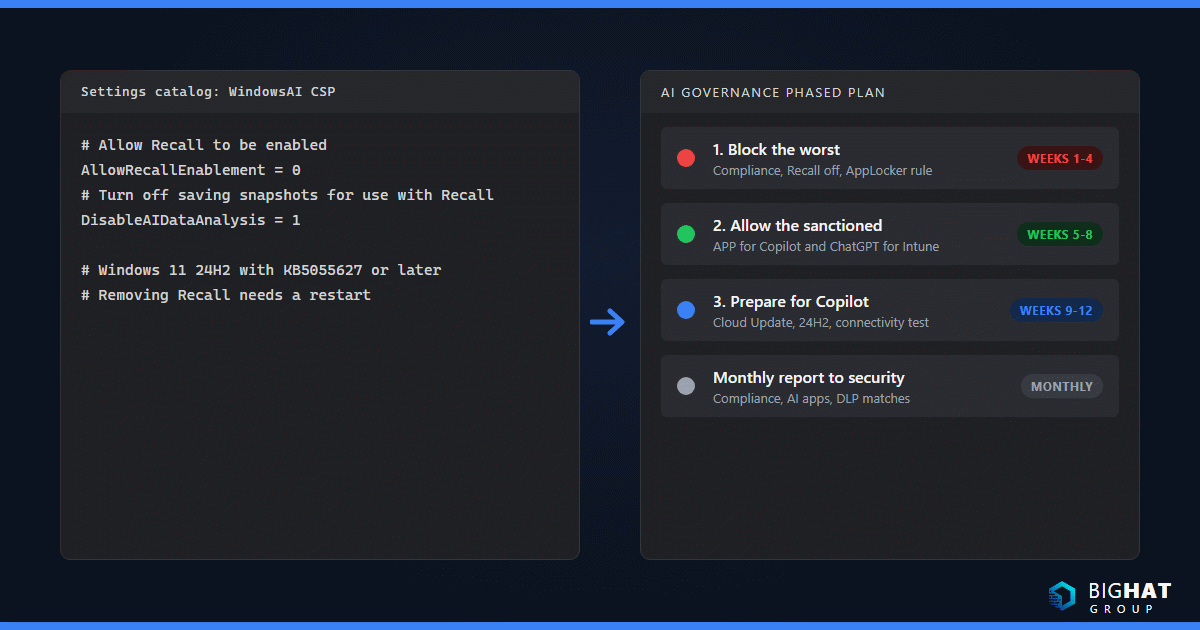
AllowRecallEnablement). Device scope, Windows 11 version 24H2 with KB5055627 (10.0.26100.3915) or later. Set to 0, the Recall component is disabled and its bits are removed, which requires a restart. Microsoft’s Manage Recall article states that Recall is disabled and removed on managed devices by default and that users cannot enable it on their own, so this policy is belt and braces. I still set it so the state is auditable. - Turn off saving snapshots for use with Recall (
DisableAIDataAnalysis). Device or user scope. A value of 1 disables snapshot saving and deletes existing snapshots. - Remove Microsoft Copilot App (
RemoveMicrosoftCopilotApp). Windows 11 version 24H2 or later. It uninstalls the consumer Microsoft Copilot app only when the Microsoft 365 Copilot and Microsoft Copilot apps are both installed, the user did not install it, and it has not been launched recently. The CSP reference says 28 days; the Intune 2603 release note says 14, so test and do not promise a date to the helpdesk. - Set Copilot Hardware Key (
SetCopilotHardwareKey). User scope, Windows 11 version 22H2 with KB5044380 or later. Takes the AUMID of the app the Copilot key should open; Microsoft’s example for the Microsoft Copilot app isMicrosoft.MicrosoftOfficeHub_8wekyb3d8bbwe!Microsoft.MicrosoftOfficeHub. - Disable Cocreator, Disable generative fill and Disable Image Creator for Paint (
DisableCocreator,DisableGenerativeFill,DisableImageCreator). Device scope, Windows 11 22H2 (10.0.22621.4870) and 24H2 (10.0.26100.3360) or later.
Two cautions. First, the old Turn off Windows Copilot (TurnOffWindowsCopilot) policy is marked deprecated, and the Windows Copilot management article tells you to use an AppLocker publisher rule instead, with publisher CN=MICROSOFT CORPORATION, O=MICROSOFT CORPORATION, L=REDMOND, S=WASHINGTON, C=US, package name MICROSOFT.COPILOT and any version. The AppLocker rule prevents installation of the consumer app and blocks it from launching if it is already there. Second, the Microsoft Copilot app that Windows pins to the taskbar for Microsoft Entra users is the app formerly known as the Microsoft 365 app, and Microsoft Copilot Chat inside it is available at no additional cost with enterprise data protection. Removing the consumer app is not the same as removing Copilot Chat, and you control Copilot Chat pinning from the Microsoft 365 admin center.
If you need to clean the consumer app off a device by script, Microsoft documents this:
$packageFullName = Get-AppxPackage -Name "Microsoft.Copilot" | Select-Object -ExpandProperty PackageFullName
Remove-AppxPackage -Package $packageFullName
Microsoft Edge: Copilot and generative AI policies
Edge for Business is where most consumer AI usage happens, and Microsoft publishes a dedicated set of policies in the Edge policy reference. Intune service release 2607 added the newer Copilot policies to the Windows settings catalog under Devices > Manage devices > Configuration > Create > New policy > Windows 10 and later > Settings catalog > Microsoft Edge. The ones I configure:
Microsoft365CopilotChatIconEnabled(Edge 139 and later) controls whether the Microsoft 365 Copilot Chat icon shows in the Edge for Business toolbar for Entra profiles. Per theHubsSidebarEnabledpage, as of Edge 141 this is the only policy that controls the Copilot toolbar button, so stop using the sidebar policy for that purpose.EdgeEntraCopilotPageContext(Edge 130 and later) decides whether Copilot in the side pane can read page content, browsing history and video transcripts for Entra profiles. It is on by default outside the EU and off by default inside it, and Copilot cannot read pages protected by DLP policies regardless of the setting.AllowBrowsingWithCopilot(Edge 148 and later) withBrowsingWithCopilotAllowListandBrowsingWithCopilotBlockList. Browsing with Copilot only works for users with an active Microsoft 365 Copilot subscription, is off by default, and is effectively disabled until you populate the allow list.CopilotNewTabPageEnabled,ComposeInlineEnabled(Microsoft 365 Copilot writing assistance),EdgeHistoryAISearchEnabled,AIGenThemesEnabled,GenAILocalFoundationalModelSettings,BuiltInAIAPIsEnabledandCopilotCoworkToolActionsEnabledround out the generative AI group. Review each against your acceptable-use policy.- On Edge for Android and iOS (version 123 and later) the single switch is
EdgeCopilotEnabled, delivered through an Intune app configuration policy.
Mobile: app protection policies for AI assistants
The protected apps list is where Intune’s AI story became practical. The Intune protected apps reference lists the Microsoft Copilot app on Android and iOS as a Microsoft app that supports core APP settings, org allowed accounts and org data notifications (iOS 2.72 or later), and lists ChatGPT for Intune on iOS as a partner app that supports app protection policies. Other AI-adjacent partner apps on the list include Notta for Intune, Jump AI, DeepL for Intune and Harvey AI. The release note in 2606 simply reads “ChatGPT is now available as a protected app for Microsoft Intune”; as of the October 2026 revision of the list the ChatGPT entry carries an App Store link only, so do not promise Android coverage until it appears.
The iOS/iPadOS app protection policy settings that fence AI assistants:
- Send Org data to other apps set to Policy managed apps, which also blocks Spotlight search and Siri shortcuts unless left at All Apps.
- Save copies of org data set to Block, with Allow user to save copies to selected services limited to OneDrive and SharePoint.
- Restrict cut, copy and paste between other apps set to Policy managed apps or Policy managed with paste in.
- Genmoji, Writing Tools and Screen capture set to Block. These standalone settings need Intune App SDK v19.7.12 or later for Xcode 15, or v20.4.0 or later for Xcode 16, and the Intune notice explains that if Send Org data to other apps was already anything other than All apps, the three settings default to Block to preserve existing behaviour.
- Conditional launch: Min OS version, Min app version, Jailbroken/rooted devices and Max allowed device threat level with Block access or Wipe data.
Mind the minimum app versions. The Intune app for Android now enforces version 2025.11.01, and an APP policy with a Min app version conditional launch rule is how you keep AI-enabled apps on SDK builds that honour these settings.
Discovery and blocking with Defender for Cloud Apps
You cannot govern what you cannot see. Microsoft’s security-for-AI discovery guidance notes that the Defender for Cloud Apps catalog has a Generative AI category with more than a thousand AI-related apps, each with a risk assessment across 90-plus factors. The manage generative AI apps article gives the path: Microsoft Defender portal > Cloud apps > Cloud app catalog, then set the Category filter to Generative AI. Tag an app Unsanctioned and, with the Defender for Endpoint integration enabled (Settings > Cloud Apps > Cloud Discovery > Microsoft Defender for Endpoint > Enforce app access, plus Custom network indicators in Defender XDR), its domains are blocked by Microsoft Defender Antivirus network protection on onboarded Windows, macOS, Android, iOS and Linux devices. Microsoft quotes up to three hours end to end. The Monitored tag warns users and lets them bypass for a configurable number of hours, and scoped profiles let you block only specific device groups. Prerequisites are Defender for Cloud Apps plus Endpoint or Microsoft 365 E5, with real-time protection, cloud-delivered protection and network protection in block mode. Add an app discovery policy with Category equals Generative AI so a new tool alerts you the week it appears.
Control map
| Control | Platform | Policy path |
|---|---|---|
| Remove Recall and stop snapshots | Windows 11 24H2 (KB5055627) and later | Settings catalog, WindowsAI CSP AllowRecallEnablement = 0 and DisableAIDataAnalysis = 1 |
| Uninstall the consumer Microsoft Copilot app | Windows 11 24H2 and later | Settings catalog > Windows AI > Remove Microsoft Copilot App |
| Prevent the consumer Copilot app from installing | Windows 10 and 11 | AppLocker publisher rule, package MICROSOFT.COPILOT (replaces deprecated TurnOffWindowsCopilot) |
| Choose what the Copilot key opens | Windows 11 22H2 (KB5044380) and later | WindowsAI CSP SetCopilotHardwareKey (user scope, AUMID) |
| Turn off Paint Cocreator, generative fill, Image Creator | Windows 11 22H2 and 24H2 | WindowsAI CSP DisableCocreator, DisableGenerativeFill, DisableImageCreator |
| Hide or show Copilot in the Edge toolbar | Edge 139 and later (Windows, macOS) | Settings catalog > Microsoft Edge > Microsoft365CopilotChatIconEnabled |
| Stop Copilot reading page content in the Edge sidebar | Edge 130 and later | EdgeEntraCopilotPageContext |
| Allow Browsing with Copilot on approved domains only | Edge 148 and later | AllowBrowsingWithCopilot with BrowsingWithCopilotAllowList |
| Turn off Copilot in Edge mobile | Edge 123 and later (Android, iOS) | App configuration policy, EdgeCopilotEnabled |
| Fence work data in Microsoft Copilot and ChatGPT for Intune | iOS/iPadOS (both apps), Android (Microsoft Copilot only) | Apps > Protection app protection policy: data transfer, save-as, cut/copy/paste, Genmoji, Writing Tools, screen capture (iOS) |
| Stop managed apps exposing functions to on-device AI agents | Android Enterprise fully managed, dedicated, corporate-owned work profile | Settings catalog > Android Enterprise > Applications > Block apps from exposing app functions |
| Govern Apple Intelligence features | iOS/iPadOS, macOS | Settings catalog > Declarative Device Management (DDM) > Intelligence Settings and External Intelligence Settings |
| Discover and block SaaS generative AI apps | Windows, macOS, Android, iOS, Linux onboarded to Defender for Endpoint | Defender portal > Cloud apps > Cloud app catalog > Category: Generative AI, tag Unsanctioned |
| Block sensitive text or files sent to consumer AI sites | Intune-managed Windows 10/11, Edge for Business 144 and later | Purview portal > Data loss prevention > Policies > Inline web traffic > Edge for Business > All unmanaged AI apps |
| Find and disrupt local AI agents such as OpenClaw | Windows | Properties catalog Local AI Agent entity plus the Local AI Agent Baseline - OpenClaw (Preview) |
Copilot readiness
Licensing, identity and mailbox prerequisites
Microsoft renamed Microsoft 365 Copilot to Microsoft Copilot and Microsoft 365 Copilot Chat to Microsoft Copilot Chat in 2026; the admin documentation now uses the new names. The requirements article states that licensed Copilot needs an eligible Microsoft 365 subscription plus a Microsoft Copilot license, that Copilot Chat is available to eligible users without the add-on, that every user needs a work or school account in Microsoft Entra ID, and that mailbox-grounded experiences need a primary mailbox in Exchange Online. Copilot is not available with device-based licensing for Microsoft 365 Apps for enterprise, and group mailboxes are out of scope. The AI Administrator role gives Copilot administration without Global Administrator. Validate a user with the Copilot License Details diagnostic before the helpdesk hears about it.
Microsoft 365 Apps, update channel and update rings
The Office Feature Updates scheduled task must run on its regular schedule and reach its network endpoints or Copilot does not light up in Word, Excel, PowerPoint and OneNote. Keep the Microsoft 365 Apps current: Microsoft’s channel change guidance recommends Cloud Update profiles in the Microsoft 365 Apps admin center, with the Intune alternative at Settings catalog > Microsoft Office 2016 (Machine) > Updates > Update Channel. Note the July 2026 change on that same page: Semi-Annual Enterprise Channel now receives feature and security updates monthly on the same basis as Monthly Enterprise Channel, so a stale Semi-Annual build is no longer the structural blocker it was.
For Windows itself, the Recall and Copilot+ policies above need Windows 11 version 24H2 with specific cumulative updates. Intune’s Windows update management gives you update rings for deferrals and deadlines, a feature update policy that locks devices to a version such as Windows 11 24H2, and quality update policies with expedite and hotpatch. Feature, quality and driver update policies are orchestrated by Windows Autopatch and are not supported on Microsoft Entra registered devices, so BYOD Windows stays on update rings only.
Network prerequisites
Allow the entire *.cloud.microsoft domain on devices and network kit; Microsoft explicitly does not support allowing only selected application URLs beneath it. Verify WebSocket Secure (WSS) connectivity from user devices to *.office.com, *.cloud.microsoft and copilot.cloud.microsoft, because TLS inspection and aggressive proxy timeouts break Copilot. Word, Excel and PowerPoint for the web need third-party cookies, and Copilot Chat link checks need [*.]safelinks.protection.outlook.com in the Edge or Chrome CookiesAllowedForUrls policy. Microsoft provides a Copilot connectivity test at connectivity.m365.cloud.microsoft/copilot; run it from a representative office and a representative home before you assign a single licence.
Copilot+ PCs: Recall and Click to Do decisions
A Copilot+ PC is Windows 11 hardware with an NPU capable of more than 40 trillion operations per second, per the Copilot+ PC developer guide, and Microsoft now sells Surface Copilot+ PCs for Business. The governance decisions arrive with the hardware refresh:
- Recall. Minimum requirements are a Copilot+ PC meeting the Secured-core standard, a 40 TOPS NPU, 16 GB RAM, 8 logical processors, 256 GB storage with at least 50 GB free (saving pauses below 25 GB), Device Encryption or BitLocker, and Windows Hello Enhanced Sign-in Security with a biometric. On managed devices it is off and removed unless you enable Allow Recall to be enabled and disable Turn off saving snapshots for Recall, and even then each user must opt in; IT cannot start saving snapshots for anyone. If you do allow it, use the Enterprise and Education-only controls: Set maximum storage for snapshots used by Recall (10 to 150 GB), Set maximum duration for storing snapshots used by Recall (30 to 180 days), Set a list of URIs to be filtered from snapshots for Recall and Set a list of apps to be filtered from snapshots for Recall. Remote Desktop Connection, VMConnect, the Azure Virtual Desktop MSI client and RAIL sessions are filtered by default, and Microsoft points to screen capture protection in Azure Virtual Desktop and Windows 365 for the rest.
- Recall DLP. Since Windows 11 24H2 with KB5065789, Set Data Loss Prevention Provider (
SetDataLossPreventionProvider) lets Recall consult a DLP provider and drop only the offending window from a snapshot. Microsoft Purview endpoint DLP is currently the only supported provider; the documented value iskey:HKEY_LOCAL_MACHINE\software\microsoft\windows defender; value:InstallLocation; binary:endpointdlp.dll; minversion:4.18.25080.5. - Click to Do. It is enabled by default on Copilot+ PCs and eligible Windows 365 Cloud PCs, analyses screenshots locally, and is controlled by Disable Click to Do (
DisableClickToDo) per the Manage Click to Do article. That policy does not affect Click to Do inside Recall, and the CSP reference still listsDisableClickToDoagainst Windows Insider Preview builds, so pilot before you rely on it.
Data protection prerequisites to hand to the Purview team
Microsoft calls a secure and governed foundation “strongly recommended” rather than required, and that is exactly where Copilot projects stall. Hand the Purview team this list from the DLP for Microsoft 365 Copilot article: a policy on the Microsoft Copilot, Copilot Chat, and Copilot Cowork location with Content contains > Sensitivity labels to stop Copilot and Cowork processing labelled files and emails (sent on or after 1 January 2025); a rule with Content contains > Sensitive information types and the action Prevent Copilot from processing content > Processing prompts to refuse prompts carrying things like bank account numbers (preview); the sibling action Performing Web Searches to keep sensitive prompts off external web grounding; and the preview Email is received from > External users condition to keep external mail out of grounding as a prompt-injection control. The location is only available in the Custom template, cannot be combined with other locations, does not scan files uploaded into prompts, and takes up to four hours to apply. Pair it with SharePoint Advanced Management for oversharing clean-up before licences go live.
AI agents on devices
Protected apps and MAM for AI assistants
The pattern for sanctioned assistants is simple: target the Microsoft Copilot app and ChatGPT for Intune with the APP described above, require the Microsoft Entra account for sign-in, and use Conditional Access to require an app protection policy for unenrolled phones. The app protection policies overview organises the settings into three data protection framework levels; I start AI apps at Level 2 (data leakage prevention and minimum OS) and move users handling regulated data to Level 3 with Mobile Threat Defense.
Android AI agent controls
Service release 2606 introduced Block apps from exposing app functions in the Android Enterprise settings catalog under Applications. When True, apps on fully managed devices and apps in the work profile on corporate-owned devices are blocked from exposing app functions, the programmatic actions that other apps and on-device assistants or AI agents can invoke inside the app. It applies to fully managed, dedicated and corporate-owned work profile devices, not to personally owned work profiles. I set it for finance, legal and executive groups first and leave it off for shared frontline devices until the app owners confirm nothing breaks.
Apple Intelligence on iOS/iPadOS and macOS
Since service release 2603 (week of 30 March 2026) the settings catalog carries Declarative Device Management (DDM) > Intelligence Settings with Allow Apple Intelligence Report, Allow Genmoji, Allow Image Playground, Allow Image Wand, Allow Personalized Handwriting Results, Allow Visual Intelligence Summary, Allow Writing Tools, Mail > Allow Smart Replies, Mail > Allow Summary, Notes > Allow Transcription, Notes > Allow Transcription Summary, Safari > Allow Summary, Force On Device Only Dictation and Force On Device Only Translation, plus External Intelligence Settings with Allow Sign In and Allowed Workspace IDs for the ChatGPT integration. macOS gets a slightly shorter list. Service release 2605 added the deadline: with OS 26.4 Apple deprecated several intelligence-related settings in the MDM restrictions payload, so migrate from the device restrictions template to these DDM configurations now.
Local AI agents on Windows
If you read my Project Lobster and ClawPilot security guide, you know why local agents such as OpenClaw worry Microsoft’s own security team. Intune’s answer arrived in service release 2605 (week of 8 June 2026) as a preview: a properties catalog policy (Devices > Windows > Configuration > Create > New Policy > Windows 10 and later > Properties catalog) that collects a Local AI Agent entity with agent name, install location and install scope. Microsoft recommends also collecting Host process, because OpenClaw runs under process names such as node.exe and wsl.exe. Results land in Device Inventory within about 24 hours, Device Query (an Advanced Analytics capability) lets you list affected devices, and the Local AI Agent Baseline - OpenClaw (Preview) ships Windows Subsystem for Linux controls and two firewall rules that block outbound TCP from %LOCALAPPDATA%\Programs\node\node.exe and %ProgramFiles%\nodejs\node.exe. Microsoft warns the baseline may not block every execution path and may break legitimate Node.js workloads, so inventory first, baseline second, developers excluded. Further out, the WindowsAI CSP already documents Insider Preview policies for agent connectors (AgentConnectorAccessPolicy, ConfigureAgentConnectors, AgentConsentDuration); they are not for production yet, but they tell you where Windows agent governance is heading.
Endpoint Privilege Management for AI tooling installs
Developers and analysts want to install AI CLIs, SDKs and local runtimes. Rather than hand out local admin, the Endpoint Privilege Management overview lets standard users elevate approved .exe, .msi and .ps1 files under rules you define: automatic, user confirmed (with authentication or business justification), support approved, elevate as current user, or deny. Rules can match on publisher certificate or file hash and control child processes, and every elevation is reported as managed or unmanaged. EPM is a Windows capability that becomes part of Microsoft 365 E5 in July 2026 and is otherwise in the Intune Suite or the US$3.00 per user per month add-on. My rule set for AI tooling: support approved for new installers, deny for anything that tries to elevate from a Downloads folder, and a user confirmed rule with justification for the handful of signed vendor installers you have already vetted.
Compliance and reporting
Compliance policies that matter for AI
Two tenant-wide settings come first, per the compliance overview: set Mark devices with no compliance policy assigned as to Not compliant (the default is Compliant, which is the security feature switched off), and review the Compliance status validity period, which defaults to 30 days and accepts 1 to 120. In the Windows compliance policy itself, the Windows settings reference gives you Require BitLocker, Require Secure Boot to be enabled on the device, Require code integrity, Minimum OS version or the more flexible Valid operating system builds ranges (use these to require the 24H2 builds that carry the Recall policies), Microsoft Defender Antimalware, Microsoft Defender Antimalware security intelligence up-to-date, Real-time protection, Firewall, Trusted Platform Module (TPM), and Require the device to be at or under the machine risk score from Defender for Endpoint with Clear, Low, Medium or High. Windows now re-evaluates compliance in near real time when firewall, antivirus, BitLocker, Defender status, OS build, real-time protection or Secure Boot change. Feed the result into Conditional Access with Require device to be marked as compliant so an out-of-date laptop cannot reach Copilot or your sanctioned AI apps.
What to report to security monthly
Microsoft’s Intune reports article documents the paths below. My monthly pack for a security lead is one page with these numbers and a trend arrow.
| Metric | Where to get it |
|---|---|
| Compliant versus noncompliant devices, and the 30-day trend | Reports > Device compliance > Reports > Device compliance and Device compliance trends |
| Devices with no compliance policy assigned | Reports > Device compliance > Reports > Devices without compliance policy |
| Top noncompliant settings (OS build, BitLocker, Defender) | Reports > Device compliance > Reports > Noncompliant devices and settings; operational view at Devices > Monitor > Noncompliant devices |
| Windows feature update status against your 24H2 target | Reports > Windows updates > Reports > Windows Feature Update Report |
| New or unsanctioned generative AI apps and blocked access events | Defender portal > Cloud apps > Cloud discovery, filtered to Generative AI |
| DLP matches for text and files sent to consumer AI sites | Purview activity explorer with enforcement plane set to browser, plus DSPM for AI |
| Managed and unmanaged elevations, including AI tooling installs | Endpoint Privilege Management reports |
| Devices with a local AI agent present | Device Inventory and Device Query on the Local AI Agent entity |
A phased plan: block the worst, allow the sanctioned, prepare for Copilot
| Phase | Weeks | What ships |
|---|---|---|
| 1. Block the worst | 1 to 4 | Compliance policy settings to Not compliant; Windows compliance policy with BitLocker, Defender and OS build rules wired to Conditional Access; explicit Recall-off and snapshot-off policies; AppLocker rule for the consumer Copilot app; Defender for Cloud Apps Generative AI discovery policy and Unsanctioned tags on high-risk apps; properties catalog Local AI Agent collection |
| 2. Allow the sanctioned | 5 to 8 | App protection policies for Microsoft Copilot and ChatGPT for Intune at framework Level 2; Edge Copilot policies (Microsoft365CopilotChatIconEnabled, EdgeEntraCopilotPageContext, AllowBrowsingWithCopilot allow list); Purview inline DLP for All unmanaged AI apps in simulation, then block; Apple Intelligence DDM settings; Android Block apps from exposing app functions for sensitive groups; EPM rules for approved AI tooling |
| 3. Prepare for Copilot | 9 to 12 | Microsoft 365 Apps on Cloud Update; feature update policy to Windows 11 24H2 or later; *.cloud.microsoft and WSS validated with the connectivity test; Purview policy on the Microsoft Copilot, Copilot Chat, and Copilot Cowork location for labels and sensitive info types; Recall and Click to Do decision recorded for Copilot+ PC purchases; Copilot licences assigned to a pilot group and verified with the licence diagnostic |
Twelve weeks is realistic for a mid-market tenant with one Intune engineer and a cooperative Purview owner. The sequencing matters more than the dates: nothing in phase 3 is safe until phase 1 proves your compliance signal is trustworthy.
What to do about it
- Open the Microsoft 365 admin center message center and record which Intune Suite capabilities your E3 or E5 tenant received in July 2026; cancel any overlapping add-on or third-party contract at renewal.
- Set Mark devices with no compliance policy assigned as to Not compliant and confirm every Windows, macOS, iOS and Android device has a compliance policy assigned.
- Deploy a Windows compliance policy that requires BitLocker, Secure Boot, code integrity, current Defender signatures, real-time protection and a Valid operating system builds range covering Windows 11 24H2 (10.0.26100.3915) or later.
- Create a settings catalog profile with
AllowRecallEnablement= 0 andDisableAIDataAnalysis= 1, and a second profile for Copilot+ PC pilots if the business wants Recall, including storage, duration, URI and app filters and the Purview DLP provider string. - Publish the AppLocker publisher rule for
MICROSOFT.COPILOTand retire any profile still usingTurnOffWindowsCopilot. - In the Defender portal, filter the cloud app catalog to Generative AI, create a discovery policy that alerts on new apps, enable Enforce app access and Custom network indicators, and tag the apps your acceptable-use policy forbids as Unsanctioned.
- Build iOS and Android app protection policies that include the Microsoft Copilot app (and ChatGPT for Intune on iOS), with Send Org data to other apps at Policy managed apps, save-as blocked, Genmoji, Writing Tools and screen capture blocked on iOS, and Min app version conditional launch rules.
- Configure the Edge policies:
Microsoft365CopilotChatIconEnabled,EdgeEntraCopilotPageContext,AllowBrowsingWithCopilotwith an allow list, andEdgeCopilotEnabledthrough app configuration on mobile. - Have the Purview owner create the Inline web traffic > Edge for Business DLP policy scoped to All unmanaged AI apps in simulation mode, review activity explorer for two weeks, then switch text upload and file upload to Block.
- Move Apple Intelligence controls from the device restrictions template to Declarative Device Management (DDM) > Intelligence Settings and External Intelligence Settings, and enable Block apps from exposing app functions for corporate-owned Android groups that handle sensitive data.
- Assign a properties catalog policy collecting the Local AI Agent entity and Host process, query the results, then pilot the Local AI Agent Baseline - OpenClaw (Preview) with developers excluded.
- Define EPM elevation rules for approved AI installers (support approved by default, deny from Downloads) and review the managed and unmanaged elevation reports monthly.
- Run the Copilot connectivity test from office and home networks, allow
*.cloud.microsoftand WSS to the three documented domains, and move Microsoft 365 Apps to Cloud Update before licences are assigned. - Hand the Purview team the Microsoft Copilot, Copilot Chat, and Copilot Cowork DLP location requirements (sensitivity labels, sensitive info types in prompts and web search, external email) and get a sign-off date before the pilot group is licensed.
- Subscribe to the Intune What’s New series so the next protected app, DDM key or WindowsAI policy lands in your backlog the week Microsoft ships it.
Need a second pair of hands? Big Hat Group provides Microsoft Intune consulting for organizations in the United States and Canada, from a two-week health check to a full migration. Book a discovery call to talk through your environment.
Sources
- Microsoft Intune protected apps
- What’s new in Microsoft Intune
- Microsoft Intune licensing
- Microsoft Intune advanced capabilities
- Microsoft Intune plans and pricing
- Endpoint Privilege Management overview
- Microsoft Copilot requirements
- License options for Microsoft Copilot
- Change the Microsoft 365 Apps update channel
- Policy CSP - WindowsAI
- Manage Recall for Windows clients
- Manage Click to Do for Windows clients
- Updated Windows and Microsoft Copilot Chat experience
- Copilot+ PCs developer guide
- Microsoft Edge browser policies
- Microsoft365CopilotChatIconEnabled
- EdgeEntraCopilotPageContext
- AllowBrowsingWithCopilot
- HubsSidebarEnabled
- EdgeCopilotEnabled
- App protection policies overview
- iOS/iPadOS app protection policy settings
- Collect device properties with the Intune properties catalog
- Local AI Agent Baseline - OpenClaw settings
- Device compliance policies in Microsoft Intune
- Windows compliance settings in Microsoft Intune
- Microsoft Intune reports
- Windows update management overview in Intune
- How do I discover AI apps in my organization?
- Manage generative AI apps for your organization
- Govern discovered apps using Microsoft Defender for Endpoint
- Microsoft Purview DLP for Microsoft 365 Copilot and Cowork
- Data Loss Prevention for cloud apps in Edge for Business
- Help prevent sharing via Edge for Business to unmanaged AI apps
- Security Copilot in Intune overview
- Microsoft Intune device and app management in Microsoft 365 Business Premium
- Overview of device management for frontline workers