
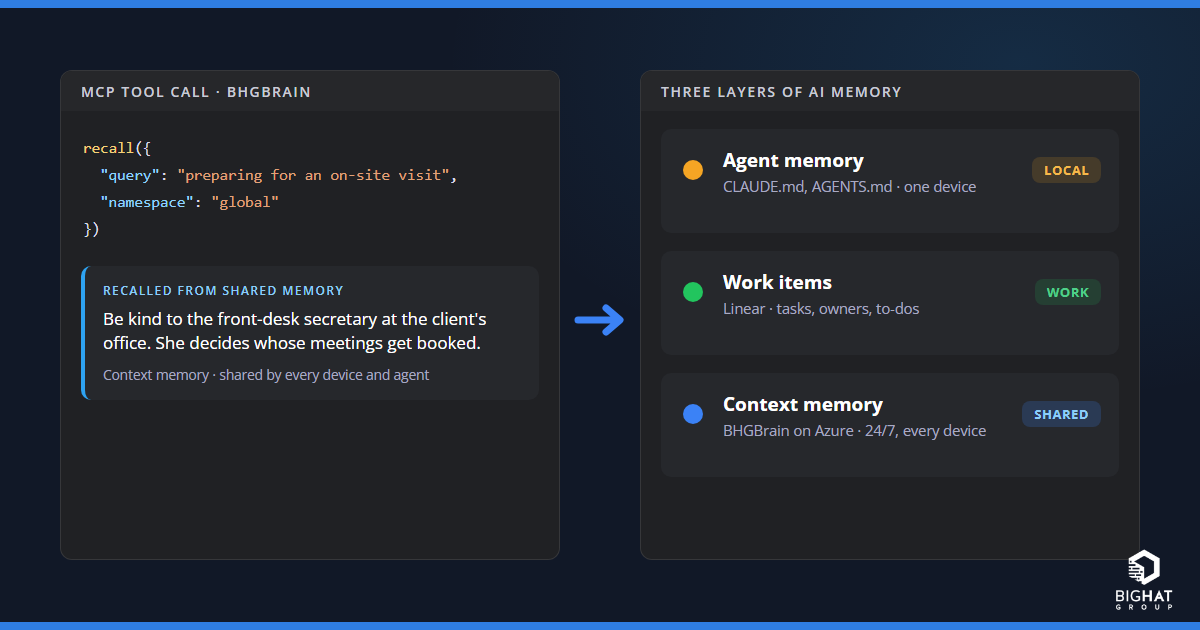
I use a lot of AI agents in a day: Claude Code in a terminal, GitHub Copilot in VS Code, Codex on another machine, OpenClaw on a Cloud PC, and a handful of scripts on build agents. For a long time each of them remembered things in its own silo. What Claude Code learned on my laptop, Copilot on my desktop didn’t know. What I told an assistant on Tuesday, I was explaining again on Thursday.
Over the past year I’ve settled on a way of thinking about AI memory that fixes most of this. It has three layers, and the third one is where BHGBrain , our open-source memory server, earns its keep. This post explains the three layers, and then the architecture that makes the third layer work: one BHGBrain server running around the clock on a small Linux VM in Azure, reachable privately from every device and every agent through Tailscale.
The three layers of AI memory
Not every piece of information belongs in the same place. When I look at what my agents need to know, it falls into three groups:
| Layer | Where it lives | What it holds | Example | How long it lasts |
|---|---|---|---|---|
| 1. Agent memory | Each agent’s own files and settings on one device: CLAUDE.md, AGENTS.md, built-in memory | How to work in this project with this tool | “Run the linter before every commit.” | As long as the project |
| 2. Work items | A ticketing system such as Linear | Things to do, who owns them, their status | “Renew the client’s certificate by Friday.” | Until the ticket closes |
| 3. Context memory | BHGBrain, shared by every device and agent | What you know that is neither a task nor a project rule | “Be kind to the front-desk secretary at the client’s office. She decides whose meetings get booked.” | As long as it stays useful |
The first two layers are well understood. Agent instruction files tell a tool how to behave in a repository. Linear holds the work: every to-do has an owner, a status and an end.
The third layer is the one most people are missing. Take the secretary example. It isn’t a task, so there’s nothing to open or close in Linear. It isn’t a project rule either: you wouldn’t put it in a CLAUDE.md that loads into every coding session, and you certainly wouldn’t commit it to a shared repository. Yet it’s exactly what you want an assistant to remember when it helps you prepare for a visit to that office.
A lot of useful knowledge looks like that:
- a customer prefers meetings before 10:00 and hates surprise agenda items;
- the fix that worked the last time the VPN dropped on a particular laptop model;
- which of a client’s tenants is production and which is the test copy;
- why a decision was made, not just what was decided;
- the vendor contact who answers email but never the phone.
None of it is a task, and none of it is an instruction for a codebase. It’s context: the kind of thing a good colleague just remembers. BHGBrain gives your agents a place to keep it.
Why the context layer has to be central
You can run BHGBrain on your own laptop, and that’s a fine way to try it. But a memory on your laptop is a memory for your laptop. It’s offline whenever the laptop is closed, and the desktop, the Cloud PC, the WSL environment and the build agent all start from nothing.
My AI ecosystem isn’t one device or one vendor, and I suspect yours isn’t either. For the context layer to be useful, it needs to be:
- always on, 24 hours a day, so any agent can reach it at any time;
- reachable from every device, whether that’s Windows, macOS, Linux, WSL or a Windows 365 Cloud PC;
- usable by every agent that speaks the Model Context Protocol (MCP), not tied to one tool;
- private, because it holds exactly the kind of notes you would never post publicly;
- yours, living in your own subscription where you control backups and retention;
- inexpensive, because it’s one person’s or one small team’s memory.
That list points to a small server you own, on a private network. Here’s the design I use.
The architecture: BHGBrain on an Azure Linux VM
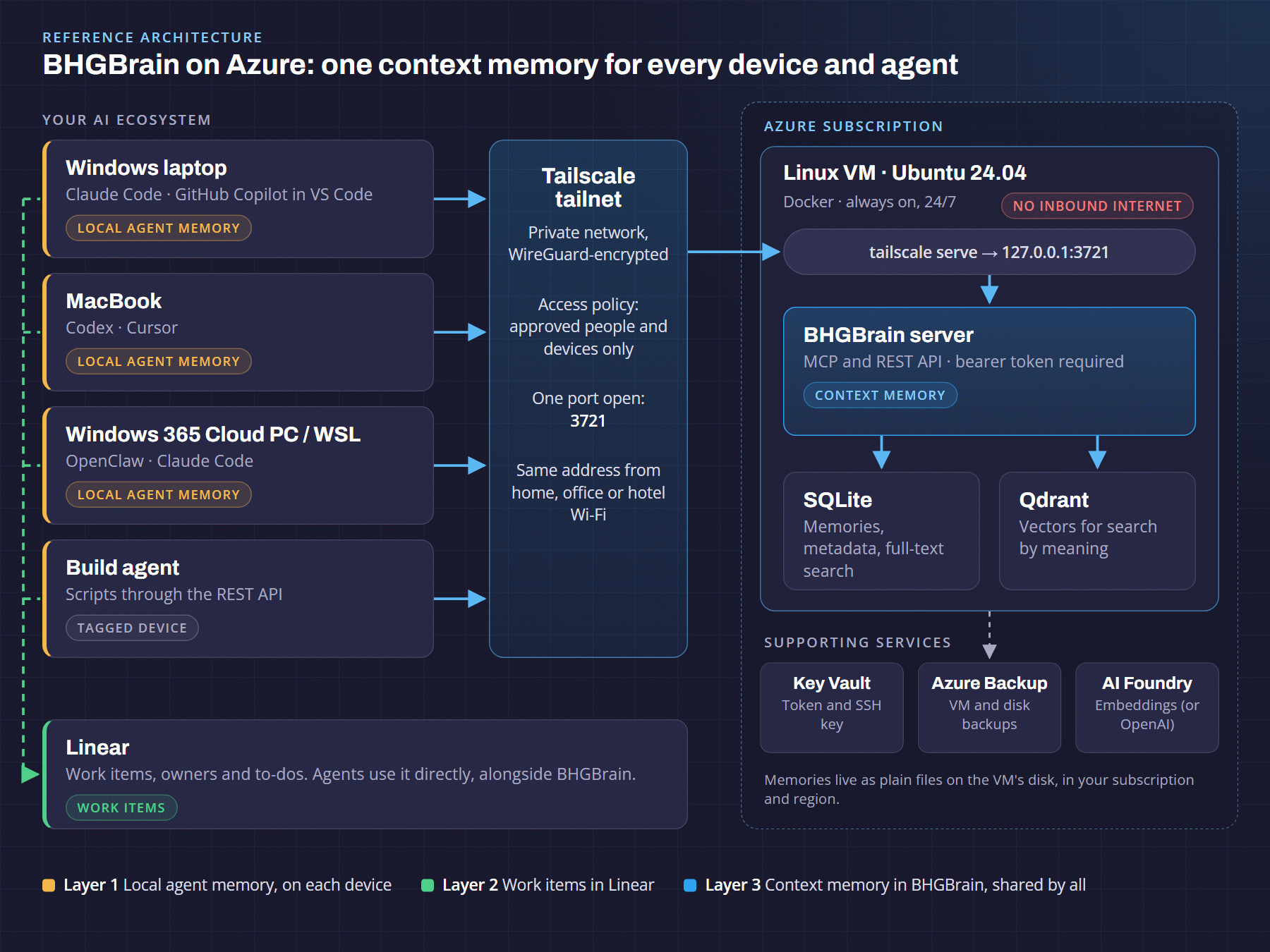
Reading the diagram from left to right:
- Your devices and agents. Every laptop, desktop, Cloud PC or build agent runs its AI tools as usual, and each tool keeps its own local memory (layer one). Tools also talk to Linear for work items (layer two). For layer three, they all point at the same address: the BHGBrain server.
- A private Tailscale network. Each device runs Tailscale, which builds an encrypted network (a “tailnet”) between your devices, wherever they are. An access policy decides who may reach the memory server, and on which port. Nobody outside the tailnet can see it.
- One Linux VM in Azure. A small Ubuntu VM runs two containers with Docker: the BHGBrain server and Qdrant, the vector database it uses for meaning-based search. BHGBrain keeps the memories themselves in SQLite on the VM’s disk. The VM’s network security group has no inbound rules, so nothing on the internet can reach it.
- Supporting Azure services. Key Vault holds the SSH key and access token. Azure Backup protects the disk. Embeddings, the numeric “fingerprints” that make search by meaning work, come from OpenAI or from Azure AI Foundry, which keeps that traffic inside your own tenant.
What happens when an agent remembers something
Say I’m in Claude Code on my laptop and tell it: “Remember that the client’s change window is Thursday evenings, and approvals go to their IT lead.”
- Claude Code sends a
rememberrequest to the BHGBrain server’s address on the tailnet. - Tailscale checks the access policy. My laptop is allowed, so the request travels over the encrypted tunnel to the VM.
- BHGBrain checks the request’s access token, screens the content for anything that looks like a password or API key, and checks whether it already knows this fact.
- It stores the memory in SQLite and its embedding in Qdrant, with a retention tier that decides how long it lives.
That afternoon, on my desktop, Copilot in VS Code asks “When is the client’s change window?” and gets the answer straight back, even though it was saved from a different machine and a different tool.
Why a Linux VM in Azure
There are simpler and fancier ways to host a memory server. A single VM hits the sweet spot for an individual or a small team:
- It’s always on. The memory is there at 6 a.m. from a phone hotspot and at midnight from a Cloud PC.
- It’s simple. Two containers and one configuration file. Updating is a
git pulland a restart. Docker brings everything back after a reboot. - It fits the Azure tools you already use. Azure Backup, Key Vault, Azure Monitor and Azure AI Foundry all plug in directly.
- Your data stays where you put it. The memories are plain files on a disk in your subscription and the region you choose, which matters if you care about data residency .
- It’s inexpensive. One small VM, not a cluster.
How it compares with the alternatives:
| Option | What you get | The catch |
|---|---|---|
| A copy on each device | Nothing to host | A separate memory per device. Nothing carries over. |
| A public endpoint with TLS | Reachable from anywhere, including cloud-hosted assistants | An internet-facing server full of private notes, protected only by a token. You own TLS, firewall rules and patching risk. |
| Managed containers | No operating system to patch | Persistent databases and private networking add cost and complexity for a one-person workload. |
| One Linux VM + Tailscale | One memory for every device and agent, always on, no public ports | One VM is a single point of failure, so back it up. |
Why Tailscale instead of opening a port
The usual way to reach a server from anywhere is to open a port to the internet and put a login in front of it. For a server whose whole job is to remember private things, I’d rather not.
With Tailscale:
- No inbound internet ports. The VM accepts no connections from the internet. Tailscale makes outbound connections and builds the private network from there.
- Access is per person and per device. The access policy names a group of people allowed to use the memory server, and opens only its one port to them. Administrators also get SSH. Nobody else on your tailnet, let alone the internet, can connect.
- Two locks, not one. Being on the tailnet isn’t enough. Every request still needs BHGBrain’s bearer token.
- Lost laptop? One click. Removing a device in the Tailscale admin console cuts it off immediately.
- Encrypted everywhere. Traffic runs inside WireGuard tunnels, so plain HTTP inside the tailnet is already encrypted from device to VM.
- It works the same everywhere. Home, office, hotel Wi-Fi or a client’s guest network: the address is always the same.
How it behaves like a second brain
A second brain only works if you can throw things into it without worrying about clutter. BHGBrain’s retention tiers are what make that possible:
| Tier | What usually lands there | How long it lasts without use |
|---|---|---|
| T3, transient | Ticket numbers, email summaries, “today” and “by Friday” notes | 30 days |
| T2, operational (default) | Meeting outcomes, project status, current investigations | 90 days |
| T1, institutional | Decisions, how-tos, vendor and system details | 365 days |
| T0, foundational | Policies, standing rules, your profile | Never expires |
Three behaviours make this feel like memory rather than storage:
- Use keeps memories alive. Every time a memory is recalled, its clock resets. Knowledge you use never expires. Knowledge you never use cleans itself up, and goes to an archive first so it can be restored.
- Things you keep needing get promoted. A memory recalled five times moves up a tier. The “random” fact you keep looking up becomes long-term knowledge without you doing anything.
- The right context shows up at the right time. At the start of a session, an agent can load your standing rules, pinned memories and the memories most relevant to the task at hand, instead of a giant file of everything.
There’s housekeeping too. Duplicates are merged rather than piling up. Tags are added automatically. Anything that looks like a credential is rejected before it’s stored, which matters for a brain you feed all day. And if you turn it on, a nightly “distillation” job condenses clusters of related short-term notes into one lasting fact.
On day one, BHGBrain’s built-in onboarding interview captures your role, your clients and your environments as permanent memories, so every agent on every device starts out knowing who you are.
A day across devices
To make it concrete, here’s an illustrative day:
- 08:30, Windows laptop, Claude Code: “Remember that the client’s change window is Thursday evenings.” Stored as an operational fact.
- 09:15, same laptop: “Note ticket INC-4821: the VPN drops on Wi-Fi 6E adapters; disabling 6 GHz fixes it.” The ticket number marks it as transient.
- 13:00, desktop, Copilot in VS Code: “When is the client’s change window?” Answered instantly from the shared memory.
- 15:30, MacBook, Codex: preparing for an on-site visit, the agent recalls the note about the front-desk secretary along with the client’s meeting preferences.
- 17:00, Cloud PC, OpenClaw: starts a session primed with the client’s standing rules and recent decisions.
- Next week: the VPN workaround has been recalled from three machines and is promoted to a longer-lived tier. The one-off notes nobody needed quietly expire.
Five tools on four devices, and none of them were told anything twice.
What it costs
| Item | Approximate cost | Notes |
|---|---|---|
Linux VM, 2 vCPU and 8 GiB of memory (Standard_B2ms) | Roughly US$60–70 a month at pay-as-you-go rates | A 4 GiB size costs about half and suits personal use. Reservations and savings plans lower it further. Check the Azure pricing calculator for your region. |
| Disk, public IP for outbound traffic, Key Vault, backup | A few dollars to the low teens a month | Depends on disk type and backup retention |
| Tailscale | Free on the Personal plan | The Personal plan is for non-commercial use, up to six users. Business use needs a paid plan. |
Embeddings (OpenAI text-embedding-3-small) | US$0.02 per million tokens | Thousands of memories cost cents |
For a private memory shared by every AI tool you use, that’s about the price of a few streaming subscriptions.
Trade-offs to know about
No design is free of compromises. These are the ones I’d want a manager to hear up front:
- Cloud-hosted connectors can’t reach it. Connectors added on claude.ai on the web or phone run from the vendor’s cloud, which isn’t on your tailnet. Agents running on your own devices work fine. That’s the price of keeping the server off the internet.
- One shared access token. Tailscale controls which people and devices get in. The token is the same for everyone, so rotate it when someone leaves.
- One VM is one point of failure. Back up the memory files and the VM. The vector database can be rebuilt from the memories if it’s lost.
- Embeddings leave the VM. Memory text is sent to the embedding provider. Using Azure AI Foundry keeps that inside your own tenant.
- Be thoughtful about what you store. Notes about people should be the professional kind you’d be comfortable with them reading. Namespaces keep each client’s context separate.
Getting started
The full, step-by-step walkthrough lives in the BHGBrain repository: Deploying BHGBrain on an Azure Linux VM with Tailscale . At a high level:
Prepare the tailnet. Tag the server, create a group of users, and allow that group to reach only the memory server’s port.
Create the VM. A small Ubuntu VM with no inbound firewall rules, its SSH key stored in Key Vault.
Install Docker and Tailscale. Azure’s Run Command does this without opening SSH to the internet.
Start BHGBrain. Clone the repository, add the access token and embedding key, and start the two containers.
Publish it on the tailnet. One
tailscale servecommand makes it reachable at the same address from every device.Connect each device. Install Tailscale, then add the server to each AI tool. In Claude Code that’s a single command:
claude mcp add --transport http --scope user bhgbrain \
  http://bhgbrain:3721/mcp --header "Authorization: Bearer <token>"
Teach it who you are. Run the onboarding interview once, and every agent benefits.
What to do about it
If your team is using more than one AI tool, or the same tool on more than one machine, you already have the problem this solves. My suggestions:
- Name the three layers. Agree what goes in agent instruction files, what goes in Linear, and what goes in shared context memory. Most of the friction disappears once people know where things belong.
- Start with one person. Run BHGBrain for yourself on a small VM for a month. The value shows up in how rarely you repeat yourself.
- Keep it private by default. No public ports, Tailscale access rules, a bearer token, and backups from day one.
- Grow on purpose. Add teammates through the Tailscale group, use namespaces to separate clients, and decide together what the memory should and shouldn’t hold.
If you want help designing the Azure side, the access model, or how memory fits into your wider agent rollout, that’s the kind of work we do in our AI automation and Azure consulting practices.
Frequently asked questions
What is an AI second brain?
A shared, long-term memory your AI assistants can write to and recall from across sessions. Instead of re-explaining your clients, environments and preferences in every chat, an assistant stores what it learns and retrieves the relevant pieces later. BHGBrain provides this over the Model Context Protocol, so any MCP-capable agent can use it.
How is BHGBrain different from CLAUDE.md, AGENTS.md or built-in agent memory?
Local agent memory tells one tool how to work in one project on one device, and it’s usually loaded in full every session. BHGBrain is a separate, shared layer for context that spans projects, devices and tools: people, preferences, environment details, lessons learned and decisions. It retrieves only what’s relevant to the task.
Why host BHGBrain on an Azure VM instead of my laptop?
A copy on your laptop is a memory for that laptop, and it’s offline whenever the laptop is. A small Linux VM in Azure runs 24/7, so every device and agent shares the same memory, and you get Azure Backup, Key Vault and the option of in-tenant embeddings with Azure AI Foundry.
Is it safe to put my AI memory server in the cloud?
In this design the VM has no inbound internet ports. Devices reach it over a private Tailscale network that only approved people and devices can join, and every request still needs a bearer token. BHGBrain also rejects content that looks like a password or API key before storing it.
Which AI tools can use a shared BHGBrain server?
Any MCP client on a device in your tailnet that can connect to a remote MCP server, such as Claude Code, Codex, GitHub Copilot in VS Code, Cursor and OpenClaw, plus scripts using the REST API. Desktop apps that only launch local servers can use a small local bridge. Cloud-hosted connectors can’t reach a tailnet-only server.
Sources
- BHGBrain on GitHub , project README and documentation
- Deploying BHGBrain on an Azure Linux VM with Tailscale , BHGBrain repository
- tailscale serve command , Tailscale documentation
- Tailscale pricing and April 2026 pricing update , Tailscale
- Default outbound access in Azure , Microsoft Learn (why the VM needs an explicit outbound path)
- text-embedding-3-small , OpenAI documentation