
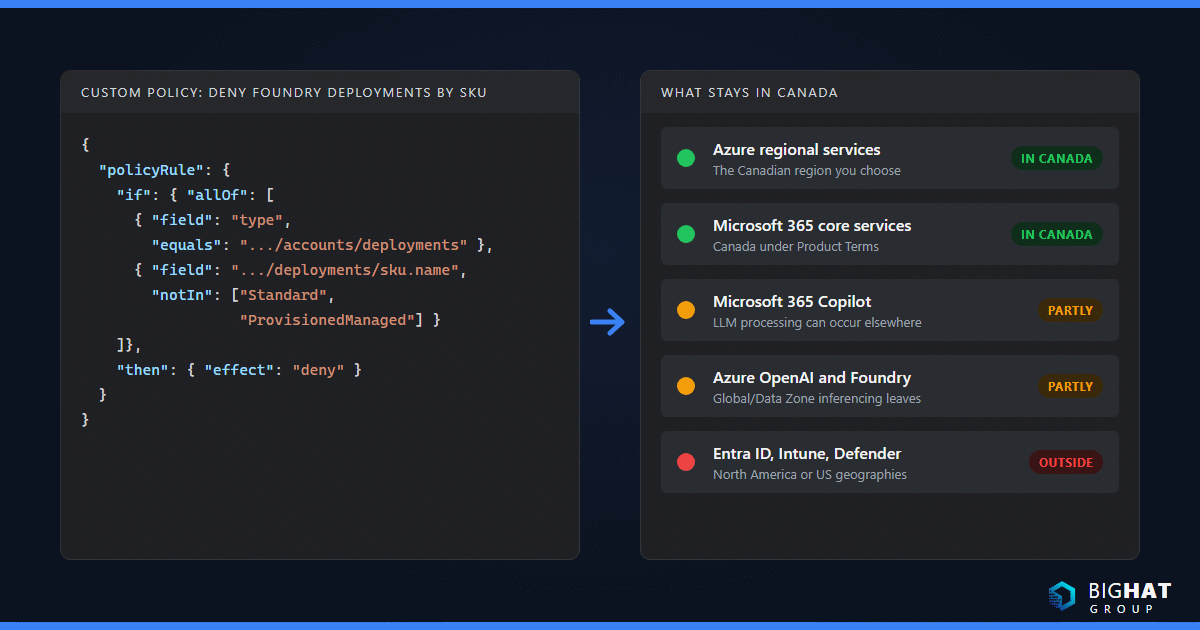
Every Canadian IT lead I talk to asks the same question before anything else: where does our data actually live? The honest answer is that “in Canada” is true for some Microsoft services, partly true for others, and not available for a few. Microsoft publishes the details, but they are spread across a dozen Learn pages written for different product teams. This guide pulls them together as of October 2026. It compares the two Canadian Azure regions, walks through what stays in Canada for Azure, Microsoft 365, Copilot, Windows 365, Azure Virtual Desktop, Entra ID, Intune and the Defender family, and finishes with the controls I use to pin a design in place. It is a technical guide, not legal advice.
Why residency comes up in Canada
Four pressures drive the conversation. The federal Personal Information Protection and Electronic Documents Act (PIPEDA) sits over most private-sector organizations. Quebec’s Law 25 modernized that province’s private-sector privacy regime and raised the bar for assessing where personal information goes. Provincial public-sector statutes, British Columbia’s FOIPPA being the one that comes up most, govern public bodies and their service providers. Federal departments work to the Protected B security category and the Treasury Board direction that Canadian residency be the principal delivery option for that data. A companion post in this Canada series covers the legal side; the rest of this guide stays on the technical question of what Microsoft commits to and how you configure it.
The vocabulary Microsoft uses
The words matter because the commitments attach to them. Microsoft’s Azure data residency page describes a Geo as a market, usually a country, that contains one or more regions, and states that “Microsoft will not store or process customer data outside the customer-specified Geo without your authorization.” Inside a Geo, Microsoft may copy data between regions for redundancy. Regional services such as virtual machines, Storage and SQL Database are deployed into a region you choose; non-regional services such as Microsoft Entra ID and Azure Content Delivery Network may store or process data in any Azure public region. Preview services typically store data in the United States.
An availability zone is a separated group of datacenters inside a region with independent power, cooling and networking. The availability zones overview makes a point that matters for this guide: for workloads constrained to a single region by residency or sovereignty requirements, deploying across zones is “the primary recommended way to maximize availability without moving data outside the region.”
A region pair is two regions, almost always in the same geography, that a small number of services use for geo-replication, sequential updates and prioritized recovery. The region pairs article is explicit that deploying into a paired region “doesn’t automatically make them more resilient,” and it uses Canada as its worked example: storage in Canada Central replicating with GRS to Canada East.
Finally, Microsoft distinguishes customer data at rest from processing. Nearly every commitment in this guide is a storage commitment. Where a processing commitment exists, I call it out.
Canada Central versus Canada East
Microsoft’s list of Azure regions gives the facts that anchor everything else.
| Canada Central | Canada East | |
|---|---|---|
| Physical location | Toronto | Quebec City |
| Programmatic name | canadacentral | canadaeast |
| Availability zones | 3 | None |
| Paired region | Canada East | Canada Central |
| Geo-zone-redundant storage (GZRS) | Available (needs zones plus a pair) | Not available (no zones) |
| Windows 365 Cloud PC provisioning | Supported | Alternate region for disaster recovery only |
| Azure Virtual Desktop metadata | Canada geography (Geographical scope) | Canada geography (Geographical scope) |
| Microsoft Sentinel | SIEM supported; data lake supported | SIEM supported; data lake not supported |
| Azure OpenAI Standard (regional) deployments | Not in the regional availability table | Listed, with a short model list |
| Median round trip to the other Canadian region | 13 ms | 13 ms |
| Median round trip to East US / East US 2 | 18 ms / 22 ms | 26 ms / 29 ms |
| Median round trip to West US 2 / West US 3 | 64 ms / 70 ms | 74 ms / 80 ms |
| Typical role | Primary region for most Canadian workloads | Geo-redundant copy, disaster-recovery target, Quebec-specific primaries |
The latency numbers are Microsoft’s published monthly P50 figures from the Azure network round-trip latency statistics, measured between regions, not from your users. I come back to what that means for Calgary, Vancouver, Toronto and Montreal below.
Service availability is the other difference. Microsoft keeps the authoritative matrix on its products available by region page, and in my experience Canada Central gets new services first and gets more of them. Check the matrix for every service in your design before you commit a landing zone to Canada East.
What stays in Canada and what does not
Here is the summary, followed by the detail and the Microsoft pages behind each row.
| Service | Customer data at rest | What leaves Canada |
|---|---|---|
| Azure regional services (VMs, disks, Storage, SQL) | The Canadian region you choose | Nothing by design; GRS stays within the pair |
| Microsoft 365 core services | Canada (Toronto, Quebec City) under Product Terms | Workloads outside the core and ADR lists |
| Microsoft 365 Copilot | Interaction content and semantic index in Canada | LLM processing can occur in other regions |
| Windows 365 | Cloud PC disk in Canada Central | Management data in North America; Intune and AVD dependencies |
| Azure Virtual Desktop | Metadata in the Canada geography; session hosts where you put them | Session diagnostics near the user; scrubbed aggregates to the US |
| Microsoft Entra ID | Geo-location chosen at tenant creation; no Canada option | Directory data lives in a multi-country geo-location |
| Microsoft Intune | North America geography (US datacenters) | Everything; Canada is not a listed geography |
| Defender for Endpoint and Defender XDR | Tenant geolocation chosen at onboarding; no Canada option | Everything; nearest option is the United States |
| Microsoft Sentinel | Raw logs in the workspace region (Canada Central or Canada East) | Processing in a US region; incidents, alerts and configuration in the Defender XDR region (US) once onboarded to the Defender portal |
| Azure OpenAI and Foundry models | Designated Azure geography for all deployment types | Global and Data Zone inferencing; Canada has no data zone |
Azure regional services
Anything you deploy into Canada Central or Canada East stays there unless you configure replication or pick a global service. The two things that catch teams are storage redundancy and backup. The Azure Storage redundancy page states that the paired secondary “is determined based on the primary region, and can’t be changed,” so GRS from a Canadian region lands in the other Canadian region, which keeps data in the Geo. GZRS requires both zones and a pair, so it is a Canada Central option only. Azure Backup follows the same logic: a Recovery Services vault “must be in the same region as the data source,” you choose Geo-redundant, Locally-redundant or Zone-redundant before the first backup, and Microsoft’s own vault guidance recommends ZRS when you need “data availability without downtime in a region, guaranteeing data residency.” Log Analytics data is stored in the workspace’s region, and Microsoft notes you can create multiple workspaces to meet “regulatory or compliance requirements to store data in specific locations.”
Microsoft 365 core services
Canada is a Local Region Geography with Microsoft 365 datacenters in Quebec City and Toronto, per the datacenter locations table. The Product Terms data residency page quotes the commitment: if you provision your tenant in Canada, Microsoft stores Exchange Online mailbox content, SharePoint site content and files, OneDrive files, Teams chat messages and the stored content of Copilot and Copilot Chat interactions at rest only within that Geo. For commercial tenants this comes with the licence; there is nothing to buy. Education tenants are the exception: outside the EU, Microsoft may store Office 365 Education data anywhere in the EU or North America unless the institution buys Advanced Data Residency for Education. Confirm your own tenant in the Microsoft 365 admin center under Settings > Org settings > Organization profile > Data location. The Default Geography is set when the tenant is created and cannot be changed afterwards, which is why a tenant someone created with a US billing address years ago is the most common residency problem I find.
Two add-ons extend the commitment. Advanced Data Residency (ADR) covers the core services plus Microsoft Defender for Office P1, Exchange Online Protection, Office for the web, Viva Connections and selected Purview services (Audit Standard and Premium, Data Lifecycle Management, Data Loss Prevention, Information Barriers and Information Protection). Canada is an eligible geography, and you must cover 100 percent of paid licences in the tenant. Multi-Geo is the other direction: one tenant, several geographies, with a per-user Preferred Data Location. Canada’s PDL value is CAN, the add-on is user-level, and Enterprise Agreement and CSP customers must buy licences for at least five percent of eligible users. Multi-Geo is the tool for a Canadian subsidiary inside a US-headquartered tenant, or the reverse.
Microsoft 365 Copilot and the EU Data Boundary question
Copilot is where storage and processing diverge. The Copilot data residency page says the content of interactions and the related semantic index “are stored at rest in the relevant Local Region Geography,” and Canada is on the Product Terms list; Copilot became a covered workload on March 1, 2024, and Copilot Chat on September 1, 2025.
Processing is a different statement. Microsoft’s Copilot privacy documentation says calls to the LLM “are routed to the closest data centers in the region, but also can call into other regions where capacity is available during high utilization periods,” and that “customers outside the EU may have their queries processed in the US, EU, or other regions.” EU customers get something more: Copilot is an EU Data Boundary service, and the EU Data Boundary is a commitment to store and process Customer Data and pseudonymized personal data inside the EU and EFTA. Even that boundary now bends: flex routing, on by default for EU tenants created after March 25, 2026, lets Copilot inferencing run in the United States, Canada or Australia during peak demand unless an admin turns it off. There is no Canadian equivalent. For a Canadian organization that means the residency position for Copilot is “stored in Canada, processed in the US, the EU or wherever capacity is available,” and your privacy assessment should say exactly that rather than claiming more. Prompts, responses and Graph data are not used to train the foundation models, and Copilot interactions are covered by Customer Lockbox through Exchange Online.
Windows 365
Windows 365 is the simplest story and the one with the sharpest constraint. The Windows 365 requirements list exactly one Canadian region for Cloud PC provisioning: Canada Central. Canada East appears only as an alternate region for Cross-region Disaster Recovery and Disaster Recovery Plus, with Microsoft’s warning that alternate regions have a single availability zone and “are not supported for Cloud PC provisioning.” The privacy and data page states that the Cloud PC virtual disk, customer content and storage “lives in the Azure region that the Cloud PC is provisioned in,” set by the Microsoft hosted network or Azure network connection in the provisioning policy. Management data such as machine names, diagnostics and service-generated data is stored in North America, Europe or Asia Pacific according to the tenant’s location, and Windows 365 inherits whatever Intune and Azure Virtual Desktop collect. If you are still weighing Cloud PCs against session hosts, my Windows 365 versus Azure Virtual Desktop comparison covers the operational trade-offs; the residency trade-off is that Windows 365 gives you a Toronto-only answer with no regional choices to get wrong.
Azure Virtual Desktop
Azure Virtual Desktop splits into two layers. Session hosts, profiles and application data sit in your subscription in whatever region you choose, and Microsoft says plainly that it does not manage that data. The control plane is a Microsoft service, and its data locations page explains that with the default Geographical deployment scope, metadata (host pool names, workspace names, application group names, user principal names) is stored in the geography associated with the region you chose. Canada (CA) is on the list of supported geographies, so a Canadian host pool keeps its metadata in Canada. The newer Regional scope, which pins metadata to one region with replicas across availability zones, is offered only in Central US and East US 2 for now; in a Canadian region the option is simply not shown. Three things still leave: session diagnostics go both to the host pool location and to “the location closest to the user,” Azure Resource Manager paths are treated as organizational information stored outside the geography, and scrubbed, aggregated service data is sent to the US. If a regulator insists the desktop itself run on your own hardware, Azure Virtual Desktop Hybrid on Arc-enabled servers, generally available since September 2026, keeps the session host on premises while the Microsoft-managed control plane handles brokering, and the same metadata rules apply.
Microsoft Entra ID and Intune
This is the part of the briefing that surprises people. Microsoft Entra ID is a non-regional service. Its data residency page says the location you pick at tenant creation maps to one of six geo-locations (Australia, Asia/Pacific, EMEA, Japan, North America, Worldwide) and “can’t be changed after it’s set.” Canada is not a geo-location, so Microsoft documents no Canada-only option for directory data; a Canadian tenant’s Core Store is replicated across two or more Azure regions inside its geo-location. Some components go further: Entra multifactor authentication logs are stored in “North America and/or in geo location,” and managed identity certificates are written to Cosmos DB in East US. Intune is the same shape. Its data storage page describes three geographies plus local geographies for Australia, India and Switzerland; its North America geography “includes data centers in the United States,” and Canada is not listed. You can read your own Intune location in Tenant administration > Tenant details > Tenant location, where it appears as something like “North America 0501.” For a Canadian privacy assessment, treat identity and device-management metadata as stored in the United States.
Defender and Sentinel
The Defender family follows a similar pattern. Defender for Endpoint operates in datacenters in the European Union, the United Kingdom, the United States, Australia, Switzerland, India and the UAE; Canadian tenants pick the US, and the data stays there for 180 days. Defender XDR lists the same geographies and warns that “once created, the Microsoft Defender tenant can’t be moved to a different region.” You can see yours under Settings > Microsoft Defender XDR > Account. Microsoft Sentinel is more Canada-friendly because it is built on a Log Analytics workspace you place: the Sentinel residency page confirms both Canada Central and Canada East for the SIEM, Canada Central only for the data lake, and states that raw data stays in the workspace region while Sentinel “processes customer data in a US region” for workspaces outside Europe and Israel. Raw logs stay in Canada; processing happens in the US, and once the workspace is onboarded to the Defender portal (mandatory after Sentinel in the Azure portal retires on March 31, 2027) incidents, alerts and configuration are stored in the Defender XDR region, which for a Canadian tenant is the United States.
Azure OpenAI and Microsoft Foundry
Microsoft’s deployment types page draws the line: for every deployment type, “data stored at rest remains in the designated Azure geography,” but inferencing differs. Global deployments may process prompts in any Azure region. Data Zone deployments keep processing inside a Microsoft-defined zone, and the zones are US, EU and Asia Pacific; there is no Canadian data zone. Standard and Regional Provisioned deployments process “within the customer-specified Azure geography.” The region availability table for Standard (regional) Azure OpenAI deployments in the Americas lists Canada East but not Canada Central, with a short catalogue (gpt-4.1-mini, the November 2024 gpt-4o, and the text-embedding models at the time of writing), while Regional Provisioned includes both Canadian regions. If you want model inferencing to stay in Canada, that is your menu, and it lags the Global catalogue by design. I show below how to block Global deployments with Azure Policy.
Protected B and Government of Canada guidance
Federal readers and their suppliers work to a published framework rather than to a residency preference. The Government of Canada security control profile for cloud-based services defines the Protected B, medium integrity, medium availability (PBMM) baseline drawn from ITSG-33, and notes that its control list has been replaced by the Canadian Centre for Cyber Security’s Medium Cloud Control Profile in ITSP.50.103. The CCCS runs the Cloud Service Provider IT Security Assessment Process, which reviews a provider’s controls against that profile. Two caveats from the CCCS itself: the assessment is not an authorization, which remains a departmental decision, and it does “not consider data residency requirements.”
Microsoft’s Canada Protected B compliance page records that Azure Core Services were assessed by CCCS under the 2019 framework agreement, that the resulting reports are available to departments on request, and that Azure provides a Canada PBMM regulatory compliance initiative in Azure Policy plus a public-sector landing zone reference. The GC Cloud Guardrails are the operational layer: thirteen guardrails that departments must implement within 30 business days of getting a cloud account. Guardrail 05, Data Location, asks departments to “establish policies to restrict sensitive GC workloads to approved geographic locations” and to demonstrate that “the service location is within Canada for all Protected B cloud services where configurable.” That last phrase, where configurable, is the honest acknowledgment that Entra ID, Intune and Defender are not configurable to Canada, and the Guideline on Service and Digital leaves the decision to store data outside Canada with the departmental CIO. None of this is legal advice; it is the map of the documents you will be asked about.
Designing for residency
Commitments are only as good as the configuration that enforces them. These are the controls I put in every Canadian design.
Pin regions with Azure Policy
Assign the built-in Allowed locations policy (definition e56962a6-4747-49cd-b67b-bf8b01975c4c) at the management group or subscription scope with Canada Central and Canada East as the only permitted values, and pair it with Allowed locations for resource groups (e765b5de-1225-4ba3-bd56-1ac6695af988). The first policy excludes resource groups, Azure AD B2C directories and resources that use the global location, which is why you need the second and why a global service such as Front Door still deploys.
az policy assignment create \
  --name "allowed-locations-canada" \
  --display-name "Allowed locations: Canada only" \
  --scope "/providers/Microsoft.Management/managementGroups/<mg-id>" \
  --policy "e56962a6-4747-49cd-b67b-bf8b01975c4c" \
  --params '{"listOfAllowedLocations":{"value":["canadacentral","canadaeast"]}}'
For AI workloads, add a custom policy that denies Foundry deployments by SKU. Microsoft publishes a single-SKU deny pattern on the deployment types page; this version inverts it to allow only the two in-geography SKUs, Standard and ProvisionedManaged (Regional Provisioned), so every Global and Data Zone deployment type is denied.
{
  "mode": "All",
  "policyRule": {
    "if": {
      "allOf": [
        { "field": "type", "equals": "Microsoft.CognitiveServices/accounts/deployments" },
        { "field": "Microsoft.CognitiveServices/accounts/deployments/sku.name", "notIn": ["Standard", "ProvisionedManaged"] }
      ]
    },
    "then": { "effect": "deny" }
  }
}
Decide where copies, backups and logs go
Pick LRS or ZRS when the data must not leave the region, and GRS or GZRS when a copy in the paired Canadian region is acceptable; both keep you inside the Geo. Create Recovery Services vaults in the same region as the workload and set the redundancy before the first backup, because Microsoft disables the option afterwards. Put the Log Analytics workspace that feeds Sentinel in Canada Central and document that Sentinel’s analytics processing runs in the US. Check every diagnostic setting and Event Hub destination; it is easy to stream Canadian logs to a US workspace someone created for a pilot.
Microsoft 365: verify, then extend
Read the Data location card before you promise anything. If the core services show Canada, the Product Terms commitment is in force. If workloads beyond the core list matter to your assessment, price ADR. If you have users who must stay in another geography, plan Multi-Geo with a PDL per user and remember that Microsoft notes Multi-Geo customers are out of scope for the EU Data Boundary even when the tenant is in the EU.
Place Cloud PCs and host pools deliberately
In the Windows 365 provisioning policy (Devices > Provision Cloud PCs > Provisioning policies > Create policy), choosing Microsoft hosted network gives you a Geography of Canada and a Region choice. Microsoft recommends All default regions within the geography for resiliency; in Canada that resolves to Canada Central because it is the only provisioning region, so the recommended option and the residency option agree. With an Azure network connection, the virtual network’s region decides, so build that virtual network in Canada Central. Windows 365 Flex in Shared mode requires a single specific region. For Azure Virtual Desktop, create the host pool in a Canadian region and accept the Geographical scope; put FSLogix profile storage and MSIX or App Attach shares in the same region as the session hosts. Big Hat Group’s Windows 365 consulting practice spends a lot of its time on exactly these placement decisions.
Control support access with Customer Lockbox
Residency is about where data sits; Lockbox is about who can reach it. Customer Lockbox for Microsoft Azure requires a support plan of at least the Developer tier, is enabled by a Global Administrator, covers Virtual Machines, Storage, SQL Database, AKS, Log Analytics, OpenAI and more, and lets subscription Owners or the Azure Customer Lockbox Approver for Subscription role approve or deny an engineer’s request, which expires after four days. Customer Lockbox for Microsoft 365 is included in E5 or available as an add-on, covers Exchange Online, SharePoint, OneDrive, Teams, Windows 365 and Copilot interactions, and is switched on under Settings > Org Settings > Security & Privacy > Customer Lockbox; requests expire after 12 hours and grant at most four hours of access. Neither covers law-enforcement requests, which Microsoft handles separately.
Latency reality for a national workforce
Residency pulls everything to Toronto or Quebec City. Your users are in Calgary, Vancouver, Edmonton and Winnipeg too, and Microsoft’s region-to-region table is the best public proxy for what the continent costs. Canada Central to West US 2 in Washington State is 64 ms at the median; to East US it is 18 ms. A Vancouver user is geographically closer to that Washington datacenter than to Toronto, so a Canada-only desktop design means western users pay a cross-continent round trip that an eastern user does not. For Ontario and Quebec users, either Canadian region is local, and the 13 ms between the two regions makes a Canada Central primary with a Canada East recovery copy painless.
Measure before you argue. The Windows 365 Cloud PC connection quality report under Reports > Cloud PC overview > Connection quality gives you per-device round-trip time, P50 over 7 or 28 days, available bandwidth, the gateway used and UDP utilization. On the protocol side, RDP Shortpath moves the session to a UDP transport with more consistent latency, and Microsoft runs TURN relays for public networks in both Canada Central and Canada East, but the relay is chosen by the client’s physical location, so a Vancouver or Calgary user may be relayed through West US 2 rather than a Canadian region; test it and record it in the assessment. The old Azure Virtual Desktop Experience Estimator now redirects to the region latency table, so plan on your own measurements rather than a Microsoft estimate for user-to-region numbers.
Common mistakes
- Trusting the tenant country without checking the card. Tenants created from a US address, or by a reseller, often land in the United States geography and cannot be moved without a migration program.
- Assuming “Canada” covers identity and endpoints. Entra ID, Intune, Defender for Endpoint and Defender XDR have no Canadian location. Say so in the assessment.
- Choosing Canada East as primary for availability. It has no availability zones. Use Canada Central for zone-redundant services and Canada East as the pair.
- Picking Global Standard for Azure OpenAI by default. It is the cheapest and newest tier, and it processes anywhere. Regional Standard exists in Canada East for a reason.
- Deploying Azure Virtual Desktop into a US region for latency and forgetting the metadata follows. A host pool in East US stores its metadata in the US geography.
- Letting diagnostic settings drift. One Log Analytics workspace in East US 2 from a proof of concept can quietly collect a year of Canadian logs.
- Confusing residency with the EU Data Boundary. Canadian tenants get storage commitments, not a processing boundary. Write the assessment accordingly.
- Skipping Customer Lockbox because the data is “in Canada.” Location does not control support access; Lockbox does.
What to do about it
- Export your tenant’s Data location card and your Intune Tenant location, and record both in the privacy assessment.
- Assign Allowed locations and Allowed locations for resource groups with
canadacentralandcanadaeastat the top management group, in Audit mode first, then Deny. - Inventory existing resources outside Canada with Azure Resource Graph and decide for each one whether to move it, document it or decommission it.
- Set storage redundancy deliberately: ZRS for single-region residency on Canada Central, GRS or GZRS when a Quebec City copy is acceptable.
- Create Recovery Services vaults per region with the right redundancy before the first backup job.
- Place the Sentinel workspace in Canada Central and document US-based analytics processing.
- Confirm Windows 365 provisioning policies resolve to Canada Central, and that any Azure network connection uses a Canadian virtual network.
- Create Azure Virtual Desktop host pools, profile storage and app shares in the same Canadian region.
- For Copilot, record the Product Terms storage commitment and the processing statement verbatim, and decide whether ADR adds anything your assessment needs.
- For Azure OpenAI, deny every deployment SKU except
StandardandProvisionedManagedby policy and build on Standard in Canada East or Regional Provisioned where the model list allows. - Enable Customer Lockbox for Azure and Microsoft 365, and assign approvers who are not the same people who open support tickets.
- For public-sector work, map the design to the thirteen GC Cloud Guardrails and request the CCCS assessment reports through your department.
Need a second pair of hands? Big Hat Group provides Azure consulting for organizations in the United States and Canada, from a residency review of an existing tenant to a full Canadian landing zone. We are based in Calgary and invoice in Canadian dollars, so the procurement conversation is as local as the data. Book a discovery call to talk through your environment.
Sources
- List of Azure regions
- Azure region pairs and nonpaired regions
- What are Azure availability zones?
- Data residency in Azure
- Azure network round-trip latency statistics
- Azure Storage redundancy
- Create and configure Recovery Services vaults
- Log Analytics workspace overview
- Microsoft 365 datacenter locations
- Product Terms data residency for Microsoft 365
- Advanced Data Residency overview
- Microsoft 365 Multi-Geo overview
- Data residency for Microsoft 365 Copilot offerings
- Data, privacy, and security for Microsoft Copilot
- What is the EU Data Boundary?
- Windows 365 requirements
- Privacy and data in Windows 365
- Create provisioning policies for Windows 365
- Cloud PC connection quality report
- Data locations for Azure Virtual Desktop
- Azure Virtual Desktop service architecture and resilience
- RDP Shortpath
- Microsoft Entra ID and data residency
- Intune data storage and processing
- Defender for Endpoint data storage and privacy
- Data retention and data security in Microsoft Defender XDR
- Geographical availability and data residency in Microsoft Sentinel
- Deployment types for Microsoft Foundry Models
- Region availability for Foundry Models sold by Azure
- Azure Policy built-in: Allowed locations
- Azure Policy built-in: Allowed locations for resource groups
- Customer Lockbox for Microsoft Azure
- Customer Lockbox requests (Microsoft 365)
- Canada Protected B - Azure compliance
- Government of Canada security control profile for cloud-based services
- CCCS Cloud Service Provider IT Security Assessment Process (ITSM.50.100)
- GC Cloud Guardrails