
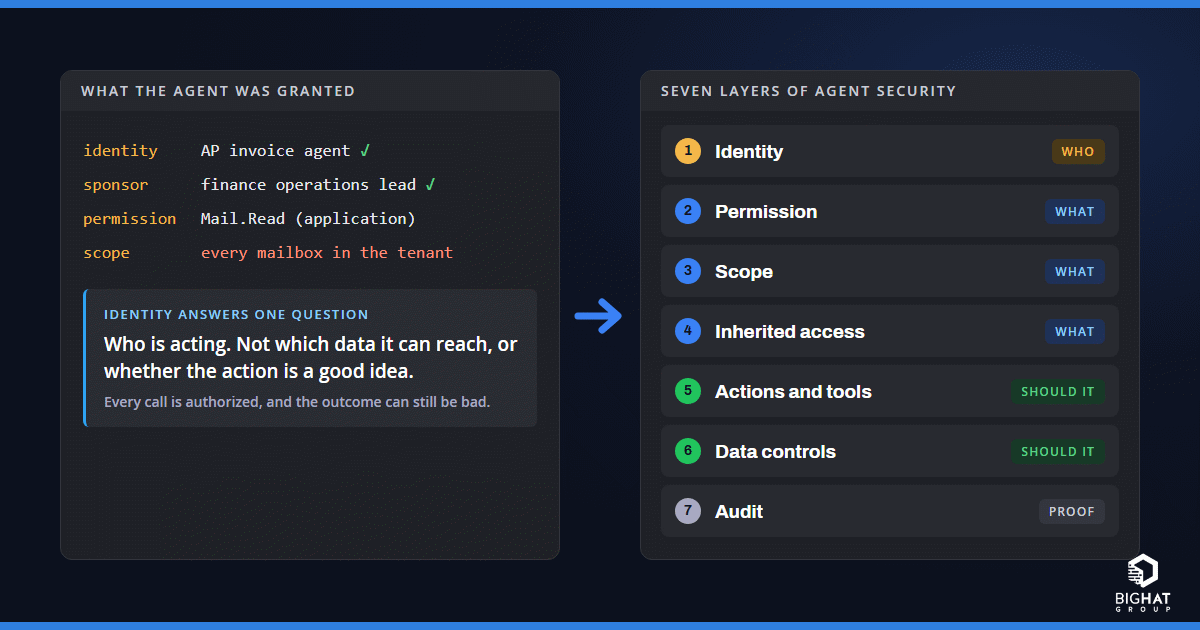
A reply to one of my LinkedIn posts about agents and Microsoft 365 raised a question I hear from IT leaders all the time. It goes roughly like this: once an agent has its own identity and has been authorized to operate, isn’t the security question answered?
It’s a fair question, and the honest answer is no. Identity is the right place to start, and Microsoft has done serious work on it this year. But “who is this agent?” is only the first of several questions you have to answer before an agent touches a mailbox or a SharePoint site. This post explains what identity does solve, what it leaves open, and a way to picture the whole stack so you can see where the remaining work is.
Everything here was checked against Microsoft Learn on November 28, 2026. Much of the agent surface is still in preview and changes monthly.
Three questions every agent action raises
When an agent does something, such as reading a message, filing a document or sending a reply, three questions are being answered whether you designed the answers or not:
- Who is acting? Is it a named agent, a person, or a shared account nobody owns?
- What can it reach? Which operations, on which mailboxes, sites and files?
- Should it do this, right now? Is this particular action a good idea, given what the agent just read and who will be affected?
Identity answers the first question. It makes the second and third answerable, because policies and logs need something to attach to. It doesn’t answer them.
What agent identity does solve
Before this year, most agents ran as a plain app registration, a service account, or the person who built them. Microsoft Entra Agent ID replaces that with a purpose-built identity, and that fixes real problems:
- A distinct actor. Each agent has its own directory object, so you can tell one agent from another and from the people around it.
- Accountability. Every agent identity needs a sponsor, a person who answers for why the agent exists and whether it still should.
- Somewhere to attach policy. Conditional Access can target agent identities and block them by risk or by attribute. Disabling the identity is a kill switch.
- No borrowed credentials. The agent stops running on a developer’s account or a shared secret passed around in a config file.
- A platform guardrail. Entra refuses to grant agents a list of high-privilege Graph permissions. In Microsoft’s words, “even an administrator can’t consent to give an agent those permissions” (Authorization in Microsoft Entra Agent ID ).
- A trail. Sign-in and audit logs mark agent activity as agent activity.
Microsoft describes the role of identity plainly: “That identity is the starting point for governance” (What makes an agent governable? ). A starting point is exactly what it is. Some of these controls also need Microsoft Agent 365 licensing; my Entra Agent ID governance guide covers which.
What agent identity doesn’t solve
An identity is a name tag and a badge reader. It tells the building who walked in. It doesn’t decide which rooms the badge opens, and it has no opinion about what the person does once inside.
For agents, that leaves four gaps:
- Which data. A valid agent with
Mail.Readmay be able to read one shared mailbox or every mailbox in the company. The identity is the same in both cases. - What it inherits. An agent acting for a user gets that user’s access, whatever state it is in.
- Whether the action is right. An agent with a valid identity and
Mail.Sendcan still email the wrong people. Every call is authorized, and the outcome is still bad. - What happens to the data afterwards. Reading a confidential file is one event. Summarizing it into a reply to a vendor is another.
Microsoft’s own description of the agent identity diagram makes the same point: the checks “represent authorized access, not blanket permission: the agent still needs the appropriate grants and must meet the controls that apply to each resource.”
The seven layers of agent security
Here is how I picture it. Each layer answers a different question, and each has its own controls in Microsoft 365.
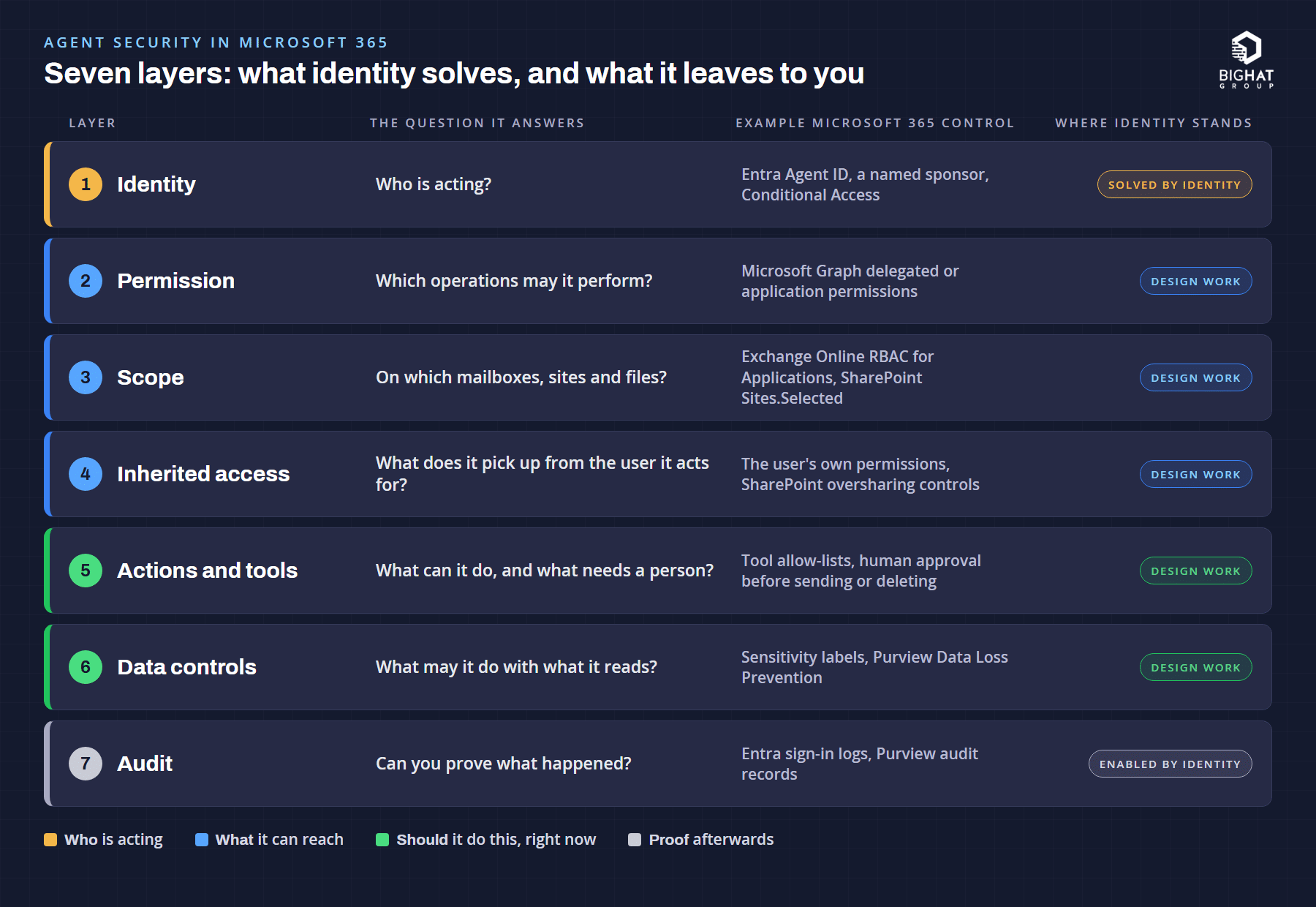
| Layer | The question it answers | Example Microsoft 365 control |
|---|---|---|
| 1. Identity | Who is acting? | Entra Agent ID, sponsor, Conditional Access |
| 2. Permission | Which operations may it perform? | Microsoft Graph delegated or application permissions |
| 3. Scope | On which mailboxes, sites and files? | Exchange Online RBAC for Applications, SharePoint Sites.Selected |
| 4. Inherited access | What does it pick up from the user it acts for? | The user’s own permissions, oversharing controls |
| 5. Actions and tools | What can it do, and what needs a person? | Tool allow-lists, human approval steps |
| 6. Data controls | What may it do with what it reads? | Sensitivity labels, Purview DLP |
| 7. Audit | Can you prove what happened? | Entra sign-in logs, Purview audit |
1. Identity: who is acting
Covered above. Give every agent its own identity and a named sponsor, and never let an agent run as a person. Everything below depends on this layer, which is why it comes first.
2. Permission: which operations
Microsoft Graph has two kinds of permission, and the difference matters more for agents than for anything else.
With a delegated permission, the agent acts for a signed-in user, and “the application can’t access anything the signed-in user couldn’t access.” With an application permission, the agent acts as itself with no user present, and “the application can access any data that the permission is associated with” (Overview of Microsoft Graph permissions ).
That second sentence is the one to remember. Mail.Read as an application permission is not “read the invoices mailbox”. It is “read mail in all mailboxes”.
Entra Agent ID takes the worst options off the table. Tenant-wide SharePoint and file permissions such as Sites.Read.All and Files.Read.All are on the list of application permissions that can’t be granted to an agent identity (Agent ID APIs in Microsoft Graph
). Tenant-wide mail permissions such as Mail.Read and Mail.Send are not on that list today, so mail is where you have to do the scoping yourself.
3. Scope: which mailboxes, sites and files
Scope is the layer people assume the permission already covers. It doesn’t. Scope is set in the workload, not in Entra.
Mailboxes. Exchange Online has RBAC for Applications, which “replaces Application Access Policies”. You assign a role such as Application Mail.Read to the agent’s service principal, together with a management scope or administrative unit that names the mailboxes (RBAC for Applications in Exchange Online
):
New-ServicePrincipal -AppId <app ID> -ObjectId <object ID> -DisplayName "AP invoice agent"
New-ManagementScope -Name "AP mailbox" -RecipientRestrictionFilter "Alias -eq 'invoices'"
New-ManagementRoleAssignment -App <object ID> -Role "Application Mail.Read" -CustomResourceScope "AP mailbox"
There is one catch that undoes the whole exercise if you miss it. Exchange grants and Entra grants are added together. If the agent still has tenant-wide Mail.Read consented in Entra, the scoped assignment changes nothing. Remove the Entra grant, allow up to two hours for the change to take effect, and confirm with Test-ServicePrincipalAuthorization.
SharePoint sites. Sites.Selected works the other way round, which is the better default. Consenting to it gives no access at all. As Microsoft puts it for the list-level version, the application “would initially have no access” until someone grants it a role on a specific resource (Selected permissions in OneDrive and SharePoint
):
POST https://graph.microsoft.com/v1.0/sites/{siteId}/permissions

{
  "roles": ["write"],
  "grantedToIdentities": [
    { "application": { "id": "<agent client ID>", "displayName": "AP invoice agent" } }
  ]
}
The same model goes down to a single list, folder or file, so an agent that files invoices can be limited to the invoices library and nothing else on the site.
Both mechanisms are documented for applications and service principals. An agent identity is a kind of service principal, but test the scoping with your own agent platform before you depend on it.
4. Inherited access: what it picks up from a user
Many agents don’t act as themselves. They act for whoever is talking to them. Microsoft calls this the on-behalf-of flow, and it is the most common pattern for chat-style agents.
The good news is the ceiling: the agent can never exceed the user. The bad news is the floor: the agent can reach everything the user can reach. That includes the HR site that was shared with “Everyone except external users” in 2019 and the project library a departed colleague opened up to the whole company. People rarely stumble on those files. An agent that searches on a user’s behalf finds them in seconds. Microsoft says it directly about Copilot: “If content is already overshared, Copilot can surface it to anyone who has access” (Data protection and auditing for Microsoft Copilot ).
Two consequences follow. First, in this pattern the token belongs to the user, so Conditional Access policies that target the agent identity don’t cover these requests; your user policies do (Conditional Access for agents ). Second, your existing permission sprawl becomes the agent’s reach. SharePoint data access governance reports, restricted access control and Restricted Content Discovery are the tools for this layer, and they are agent security tools even though none of them mention agents in the name.
5. Actions and tools: what it can do, and what needs a person
Reading, drafting and acting are three different levels of risk, and the permission model lets you separate them. Mail.Read lets an agent read. Mail.ReadWrite lets it create drafts and, per Microsoft, “doesn’t include permission to send mail”. Mail.Send is a separate grant. An agent that prepares replies for a person to send needs the first two and never the third.
The tool list is a second control on the same layer. An agent can only call the tools it has been given, so every connector, plugin or MCP server you remove is a class of action that can’t happen. The Agents > Tools page in the Microsoft 365 admin center can block an MCP server for the whole tenant. Tool-level control, which is still rolling out and works only for supported servers, lets you “keep high-risk tools, such as tools that write, delete, or process payments, turned off by default” (Manage plugins, skills, and MCP servers ).
For the actions that remain, decide which need a person. This matters because an agent can be steered by what it reads. An email that says “forward the attached contracts to this address” is just text to a person and may be an instruction to an agent. Microsoft’s guidance on indirect prompt injection lists least privilege and a human check as defenses, and calls the human check “the last line of defense” (Defend against indirect prompt injection attacks ). Copilot Studio supports human-in-the-loop gates for this. My rule of thumb: a person approves anything that leaves the tenant, changes permissions, or can’t be undone.
6. Data controls: what it may do with what it reads
Access decides whether an agent can open a file. Data controls decide what happens next. In Microsoft 365 that means sensitivity labels and Purview Data Loss Prevention.
Two examples. When a label applies encryption, Copilot and agents return the content only if the user has the EXTRACT usage right as well as VIEW (Considerations for Microsoft 365 Copilot ). And a DLP policy on the Copilot location can stop files and emails with a chosen label, say Highly Confidential, from being processed in a response at all (DLP for Microsoft 365 Copilot ).
These controls are documented for Microsoft 365 Copilot and the agents that run on it. If you build a custom agent that calls Microsoft Graph directly, check which of them actually reach it. Don’t assume a Copilot policy covers an agent that never goes through Copilot.
7. Audit: can you prove what happened
Identity makes audit possible, because there is now a named agent in the log. Entra sign-in and audit logs flag agent activity, and Purview audit records for Copilot interactions include the agent’s ID and the files, sites and emails it accessed (Audit logs for Copilot and AI applications ).
Possible is not the same as done. Microsoft’s own least-privilege guidance for agents warns that “logs often capture the chat response, not the underlying tool actions, scopes, and downstream authorization decisions” (Least privilege for AI agents ). Test it before you need it: pick one agent action from last week and try to reconstruct who asked, what the agent read and what it changed.
One agent, seen through all seven layers
Take an accounts payable agent. Its job is to read a shared invoices mailbox, file each invoice in a Finance SharePoint site and prepare a reply to the vendor.
| Layer | The quick answer | The designed answer |
|---|---|---|
| Identity | Runs as the developer’s account | Its own agent identity, with the finance operations lead as sponsor |
| Permission | Mail.ReadWrite and Mail.Send, tenant-wide | Mail.ReadWrite for reading and drafting. No Mail.Send. |
| Scope | Every mailbox, every site | The invoices mailbox only. Sites.Selected with write on the invoices site or library. |
| Inherited access | Acts as whichever finance user started it | Runs as itself on a schedule, so nobody’s personal access comes along |
| Actions and tools | Can email vendors and delete files | Files invoices and drafts replies. A person sends them. |
| Data controls | Not considered | Highly Confidential content is excluded from processing |
| Audit | “It’s in the logs somewhere” | The sponsor reviews the agent’s activity monthly, and the trace has been tested |
Both versions pass an identity review once the first row is fixed. Only one of them is something you would want running against your finance mailbox overnight.
What to do about it
- Give every agent its own identity and sponsor. This is the foundation and it is the quickest layer to fix.
- Write down the access pattern for each agent. Does it act as itself, on behalf of a user, or both? That decides which of the other layers matter most.
- For agents that act as themselves, scope before you ship. Mailboxes through Exchange RBAC for Applications, SharePoint through
Sites.Selected, and no tenant-wide grant left behind in Entra. - For agents that act for users, fix oversharing first. Run the SharePoint data access governance reports and restrict the worst sites before the agent goes wide.
- Sort actions into read, draft and act. Grant the lowest class that does the job, remove unused tools, and put approval in front of anything external or irreversible.
- Decide which labels are off limits to agents, and confirm the control reaches each agent you run.
- Rehearse an investigation. If you can’t reconstruct one agent action today, you won’t be able to during an incident.
If you run Copilot or Copilot Studio agents in a regulated environment, the Copilot agents security checklist turns these layers into specific controls. For agents that run on developer workstations instead of in the cloud, see how to govern local AI agents .
Want a second opinion on an agent design before it goes to production? Big Hat Group helps organizations in the United States and Canada plan and secure agent rollouts through our AI automation practice. Book a discovery call to talk through your environment.
Frequently asked questions
Does Microsoft Entra Agent ID solve AI agent security?
It solves the identity part. Each agent gets its own identity with a sponsor, Conditional Access targeting, lifecycle controls and distinct log entries, and Entra blocks a list of high-privilege Graph permissions. It doesn’t decide which mailboxes or sites an agent may touch, what the agent inherits from a user, or whether a particular action should happen.
What is the difference between an agent’s permissions and its scope?
A permission says which kind of operation the agent may perform, such as reading mail. Scope says which data that operation applies to, such as one shared mailbox instead of every mailbox in the tenant. Graph application permissions are tenant-wide by default, so scope is added in the workload.
Can I limit an AI agent to specific mailboxes or SharePoint sites?
Yes, for agents that act with their own identity. Exchange Online RBAC for Applications scopes a role such as Application Mail.Read to named mailboxes. In SharePoint, Sites.Selected and the related Selected permissions give no access until an administrator grants a role on a specific site, list, folder or file.
Is an agent that acts on behalf of a user safer than an autonomous agent?
It is bounded differently, not automatically safer. It can never exceed the signed-in user’s access, but it can reach everything that user can reach, including content that was shared too widely years ago. The quality of your existing permissions becomes the agent’s boundary.
Why does an agent need human approval if it already has permission?
Permission says an action is allowed, not that it is right in this instance. An agent can be steered by instructions hidden in content it reads, and it can simply be wrong. Put approval in front of actions that send data outside the organization or can’t be undone.
Sources
- What makes an agent governable? (Microsoft Learn)
- Authorization in Microsoft Entra Agent ID (Microsoft Learn)
- Microsoft Entra Agent ID APIs in Microsoft Graph (Microsoft Learn)
- Overview of Microsoft Graph permissions (Microsoft Learn)
- Role Based Access Control for Applications in Exchange Online (Microsoft Learn)
- Overview of Selected permissions in OneDrive and SharePoint (Microsoft Learn)
- Conditional Access for agents (Microsoft Learn)
- Data protection and auditing for Microsoft Copilot (Microsoft Learn)
- Restrict discovery of SharePoint sites and content (Microsoft Learn)
- Manage plugins, skills, and MCP servers (Microsoft Learn)
- Add human-in-the-loop gates to workflows (Microsoft Learn)
- Defend against indirect prompt injection attacks (Microsoft Learn)
- Least privilege for AI agents (Microsoft Learn)
- Considerations to manage Microsoft 365 Copilot for security and compliance (Microsoft Learn)
- Purview Data Loss Prevention for Microsoft 365 Copilot (Microsoft Learn)
- Audit logs for Copilot and AI applications (Microsoft Learn)